For Approver & Admin & Accounting
How Accounts Payable Works in Dolly
Dolly Card5 min read
The short answer
Accounts payable in Dolly follows one path: add a vendor, optionally raise a purchase order, upload the vendor’s invoice, get it approved, then send a payment. Approving an invoice does not pay it. A payment is a separate step with its own approval. Everything lives in the sidebar under Accounts Payable: Vendors, Purchase Orders, Invoices and Payments.
The flow
- Vendor. Add the company or person you pay, with their payment details and W-9. See Adding a Vendor.
- Purchase order (optional). Commit spend before the work happens. See Purchase Orders.
- Invoice. Upload the vendor’s bill, code each line, and send it for approval. See Uploading and Coding Invoices.
- Approval. Approvers sign off on the invoice in Dolly or from the email. See Approving Invoices, POs and Payments.
- Payment. Pick approved invoices, choose a date and send the payment for approval. See Paying Invoices.
- Paid. The money leaves on the scheduled date and Dolly marks the invoice paid. See When Vendors Get Paid.
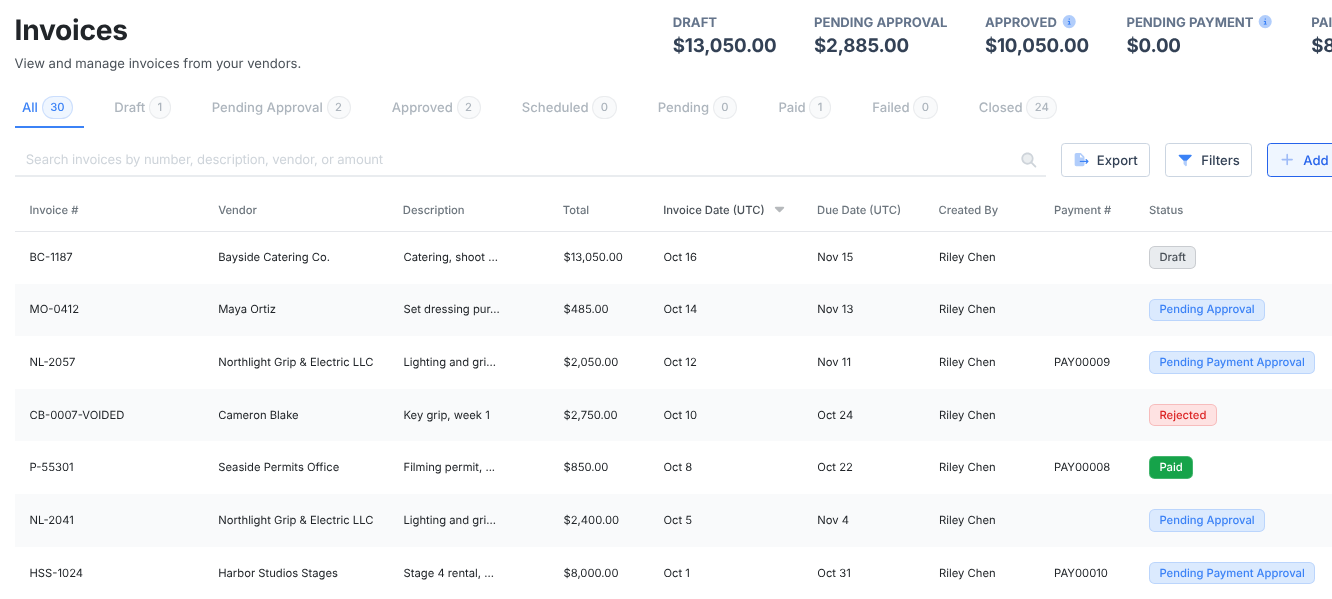
Invoice tabs
| Tab | What is in it |
|---|---|
| Draft | Saved but not sent for approval. |
| Pending Approval | Waiting on an approver. |
| Approved | Fully approved and ready to pay. Also holds invoices on a draft payment or a payment waiting for approval. |
| Scheduled | On an approved payment that has not left yet. |
| Pending | The payment is on its way to the vendor. |
| Paid | The payment arrived. |
| Failed | The payment failed or was returned by the vendor’s bank. |
| Closed | Rejected or canceled. |
Payment tabs
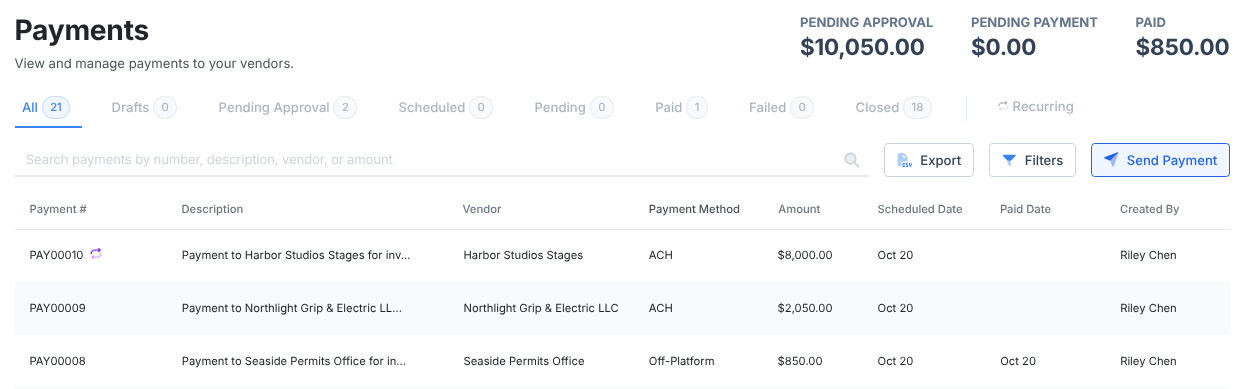
| Tab | What is in it |
|---|---|
| Drafts | Saved but not sent for approval. |
| Pending Approval | Waiting on an approver. |
| Scheduled | Approved, waiting for its send date. A payment funded from your bank shows Transferring from External Bank while that money comes in. |
| Pending | Money is on its way to the vendor, or a single-use card is waiting to be used. |
| Paid | Arrived. |
| Failed | Failed or returned. You can retry it. |
| Closed | Rejected or canceled. |
| Recurring | Recurring payments and their schedules. |
Who can do what
| Task | Who |
|---|---|
| See Vendors | Admins who manage the workspace, and anyone who approves vendors. |
| Add and edit vendors | Admins. If vendor approval is on, a new vendor or a change waits for approval before it can be used. |
| Upload invoices and POs | Admins. Crew too, when Dolly has turned that on for your production. |
| Approve invoices, POs and payments | Whoever is in that step of the approval chain in Settings → Approvals. |
| Send, cancel and retry payments | Admins only. |
| Reopen an invoice or PO | Admins, the person who created it, or a current approver. |
| Unlock an approved invoice or PO | Admins only. |
“Admin” here means anyone with manage access to the production, project or studio. You set people’s access on Crew & Departments (the Team page at a studio).
Frequently asked questions
- Does approving an invoice pay the vendor?
- No. An approved invoice sits in the Approved tab until someone sends a payment for it. The payment then has its own approval.
- When do invoices show up in the Cost Report?
- The Cost Report includes invoice lines once the invoice is paid, dated by the day it was paid, and only lines that are coded to an account. Purchase orders are commitments and do not appear in the Cost Report.
- Can crew upload invoices?
- Yes. Crew can submit invoices and purchase orders for approval, but they can never send payments.
- Why can only I make payments?
- Sending a payment needs admin access to the production. Give the other person admin access on Crew & Departments, or add them as a payment approver in Settings → Approvals if they only need to approve.
Keep reading
Get cards to your crew in as little as 24 hours.
Dolly issues controlled cards to every department, codes each charge to your budget, and keeps spend audit-ready as it happens.
& get cards to your crew in as little as 24 hours.