For Admin & Accounting
Purchase Orders
The short answer
Go to Purchase Orders and choose Add Purchase Order. Upload the PO or enter it by hand, pick the vendor and PO Type (Service, Purchase or Rental), add coded lines and choose Send for Approval. Once approved it is Open and invoices can draw on it. Choose Close when the work is done.
Create a purchase order
- Choose Add Purchase Order. Drop in a PO document to fill the form, or enter the details yourself.
- Choose the Vendor and PO Type. A rental has a Start Date and End Date; other types have a Purchase Date.
- Add a description and coded line items, and attach any quotes.
- Choose Send for Approval, or Save as Draft.
Invoicing against a PO
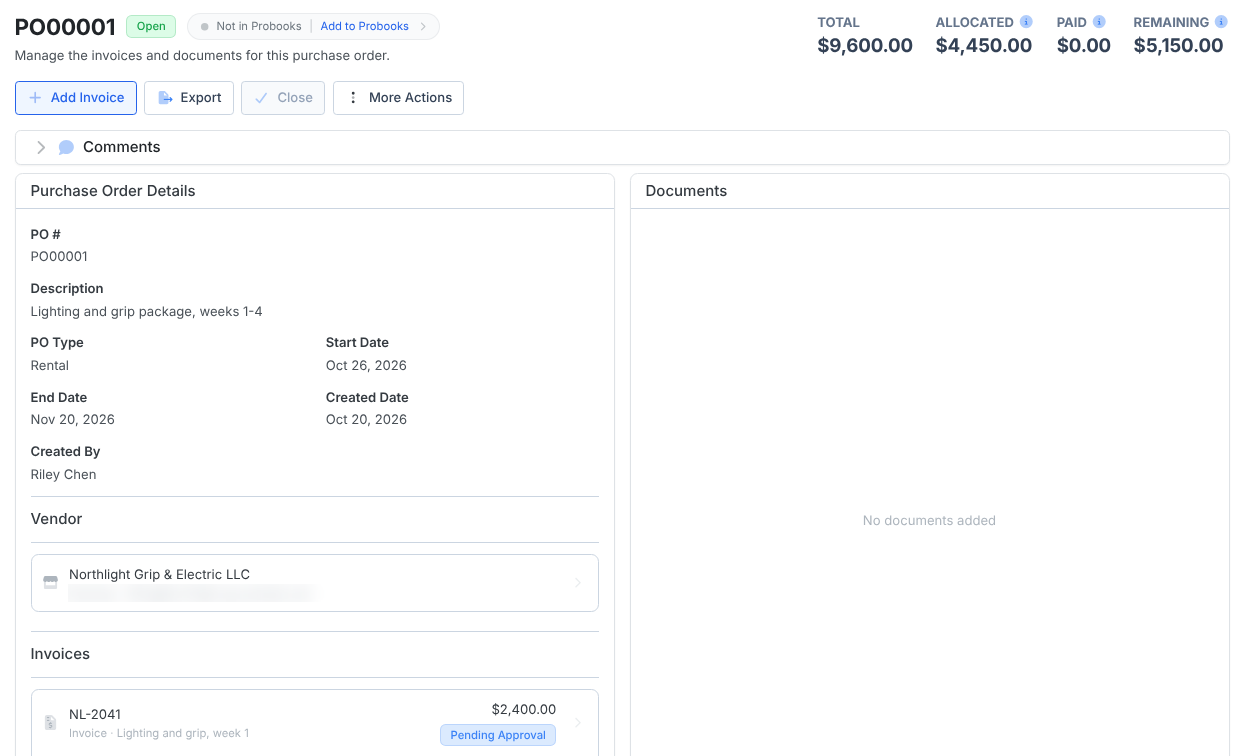
When you upload the vendor’s invoice, pick the purchase order and the lines it covers. The PO page then shows Total, Paid and Remaining, and lists its invoices. Invoices can only be added to an open purchase order.
Closing a PO
Choose Close on an open purchase order once its work is done. Every invoice on it must be paid, canceled or rejected, and at least one must be paid. If Close is greyed out, it tells you what is still open.
To save a PO as a PDF, choose Export on the PO page. The file downloads to your computer.
Frequently asked questions
- How do I delete a PO I made by mistake?
- Choose Cancel on the purchase order. A canceled PO stays in the Closed list for your records.
- Can I make a negative PO for a return?
- Not as a whole PO; a purchase order total cannot be negative. Add a negative line for the credit on the PO or on the vendor’s invoice.
- Are PO numbers unique?
- Yes. Each PO number can be used once per production or project.
- Do purchase orders sync with Probooks?
- Yes, if you send them. See Using Dolly with Probooks. If Probooks closes a PO, close it in Dolly too rather than canceling it.
Keep reading
Get cards to your crew in as little as 24 hours.
Dolly issues controlled cards to every department, codes each charge to your budget, and keeps spend audit-ready as it happens.