For Crew & Accounting
Uploading and Coding Invoices
The short answer
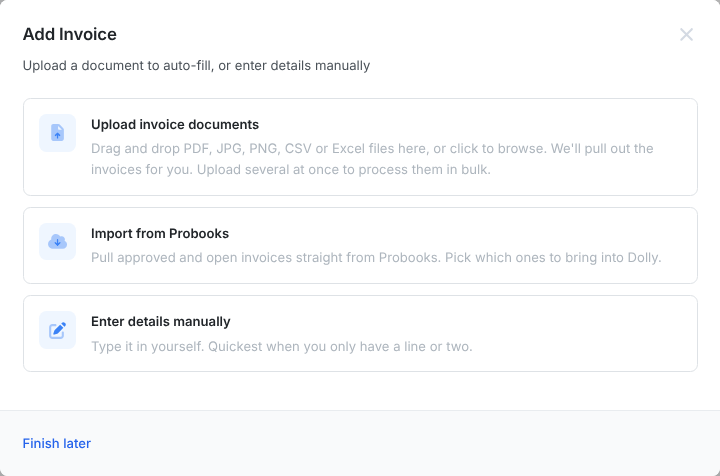
Go to Invoices and choose Add Invoice. Drop in a PDF, image, CSV or Excel file and Dolly pulls out the invoice details, or choose Enter details manually. Pick the vendor, check the number and dates, code every line to an account, then choose Send for Approval or Save as Draft.
Upload one invoice
- On Invoices, choose Add Invoice.
- Drag in the invoice, or click to browse. Dolly reads PDF, JPG, PNG, CSV and Excel files and shows “Extracting invoice data...” while it works. Choose Enter details manually to type it instead.
- Choose the Vendor. To bill against a purchase order, pick it under Purchase Orders and choose which of its lines to include. Only approved purchase orders for that vendor are shown.
- Check the Invoice #, Invoice Date and Due Date.
- Code each line to an account and fill in any other fields your production uses.
- Choose Send for Approval, or Save as Draft to finish later.
Upload several at once
Drop several files together, or one PDF holding several invoices. Dolly finds each invoice and takes you through them one by one: Review invoice 1 of 4. Choose Approve & Next to accept one, or Skip to come back to it. Finish later keeps the rest so you can carry on another time.
With the Probooks integration on, Import from Probooks pulls approved and open invoices straight from Probooks.
Frequently asked questions
- Why are some account codes missing from the list?
- The list shows the codes in your chart of accounts. If a code is missing, add it or sync it from your accounting system. With Probooks, use Sync from Probooks on the Chart of Accounts page.
- Dolly read the invoice wrong. Can I fix it?
- Yes. Everything Dolly reads is editable before you send it for approval. After that, see Fixing an Invoice.
- How do I add a discount or credit line?
- Add a line with a negative amount. The invoice total cannot go below zero.
- Vendors keep emailing invoices to Dolly Support. Where should they go?
- To your production. Dolly Support cannot add invoices for you. Give vendors your accounts payable email and upload what they send.
Keep reading
Get cards to your crew in as little as 24 hours.
Dolly issues controlled cards to every department, codes each charge to your budget, and keeps spend audit-ready as it happens.