For Admin & Accounting
Paying Invoices
The short answer
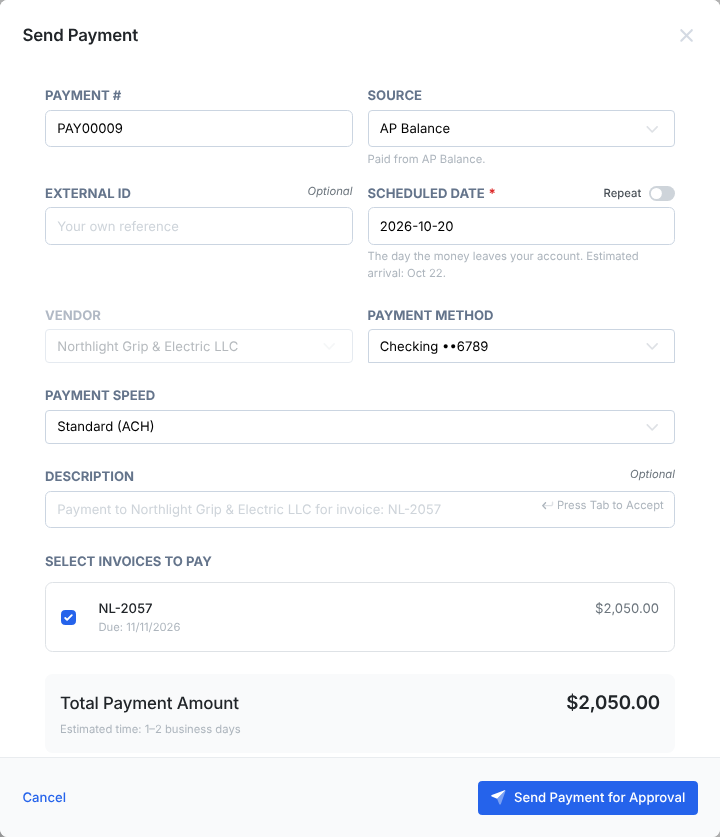
Approving an invoice does not pay it. On Payments, choose Send Payment, pick approved invoices, and choose the payment method, Payment Speed and Scheduled Date, the day the money leaves your account. Then Send Payment for Approval. Once approved, Dolly sends it on that date.
Pay one invoice
- Open an approved invoice and choose Pay Invoice. Or, on Payments, choose Send Payment and pick the invoice.
- Check the Source. Payments come from your AP balance, or from your linked bank if your account funds payments that way.
- Choose the Payment Method and Payment Speed.
- Pick the Scheduled Date: the day the money leaves your account. It must be a business day, not in the past, and at most 180 days out.
- Choose Send Payment for Approval, or Save as Draft.
Pay a batch
On Payments, choose Send Payment, then Pay an invoice in Dolly Card. Pick the approved invoices you want to pay; Dolly groups them by vendor. Choose Combine into one payment for one payment per vendor, or Pay each invoice separately. Then choose Review and submit.
Have a list of bills from your accounting system? Choose Upload a payment file to match it against the invoices already in Dolly.
Changing the date
You can change the scheduled date while the payment is a draft or waiting for approval. After it is approved, cancel it and send a new one.
Frequently asked questions
- I approved the invoice. Why hasn’t the vendor been paid?
- Approving an invoice does not pay it. Send a payment for it from the Payments page, and get that payment approved.
- Is this our Dolly balance or our bank?
- The Source field says. “Paid from” your AP balance means the money is already in Dolly. “Paid from external bank account” means Dolly pulls it from your bank first.
- Can I schedule a payment for a weekend?
- No. Banks do not move money on weekends or US bank holidays, so pick the business day you want it to leave.
- Why is the payment number PAY00002 and not our check number?
- Dolly numbers every payment. Add your own reference in External ID if you need it to match your books.
Keep reading
Get cards to your crew in as little as 24 hours.
Dolly issues controlled cards to every department, codes each charge to your budget, and keeps spend audit-ready as it happens.