For Approver & Admin
Approving Invoices, POs and Payments
The short answer
On Invoices, Purchase Orders or Payments, filter to Pending My Approval to see what is waiting for you. Open an item and choose Approve or Reject in the approval steps, then View next pending. If your production allows it, you can also approve from the email without signing in.
Approve in Dolly
- On the Invoices, Purchase Orders or Payments page, filter to Pending My Approval. Vendors waiting for you are under Pending My Approval on the Vendors page.
- Open the item and check the vendor, lines, coding and documents.
- In the approval steps, choose Approve, or Reject with a note. A rejected item goes to Closed.
- Choose View next pending to move on.

Approve from the email
When approval by email is on, the email has a link to a page where you can approve or reject without signing in. Each link works once and expires. If it has, you will see “This approval link is no longer valid”; open the item in Dolly instead. Some approvals have to be done in Dolly.
How approval chains work
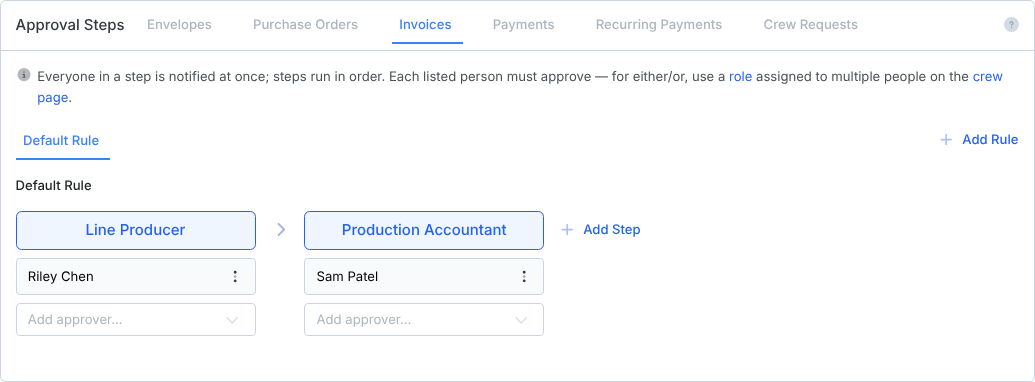
Each type has its own steps in Settings → Approvals. Everyone in a step is notified, and steps run in order. Once a chain is set, it applies to everything, including what admins upload themselves. Setup is in Approvals in Dolly.
Frequently asked questions
- Why can’t I approve this?
- Either it is not your step yet, or something is holding it. A message on the item says what: for example “Waiting for the vendor to confirm this payment method” or “This vendor must complete Dolly verification first”. See Vendor Settings and Payment Holds.
- Do I approve the invoice and the payment?
- They are separate. Approving an invoice says the bill is right. Approving a payment releases money. Your chains can have different people for each.
- How do I send something back to the person who made it?
- Reject it with a note, or ask them to reopen it. Reopening clears approvals and sends it back to draft.
- An approver’s name is missing from the payment approver list.
- Only people with access to the production can be added. Invite them on Crew & Departments first, then add them in Settings → Approvals.
Keep reading
Get cards to your crew in as little as 24 hours.
Dolly issues controlled cards to every department, codes each charge to your budget, and keeps spend audit-ready as it happens.