For Admin & Accounting
Adding a Vendor
The short answer
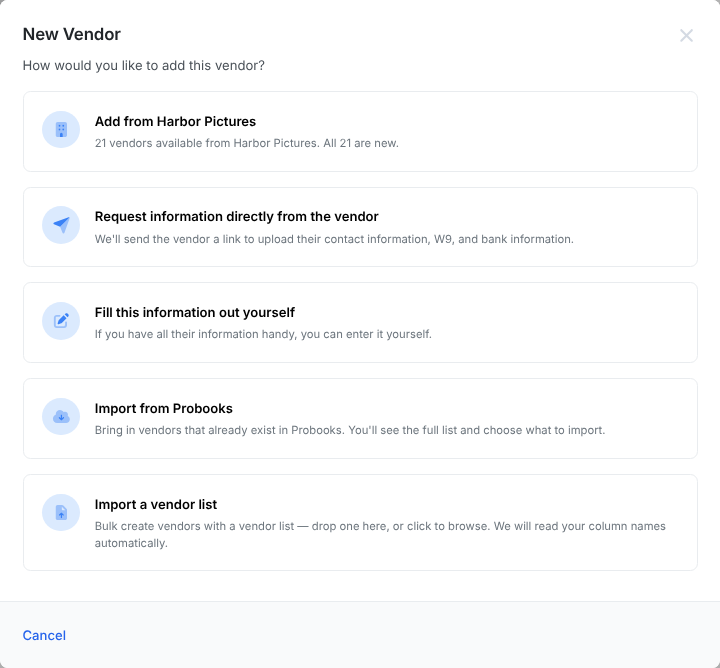
Go to Accounts Payable → Vendors and choose New vendor. You can request information directly from the vendor (Dolly emails them a link to enter their details, W-9 and bank account), fill the information out yourself, import from Probooks, or import a vendor list. Every vendor needs an email address, because that is where payment notices go.
Ask the vendor to fill it in
This is the safest way. The vendor types their own bank details, so nobody re-keys an account number.
- Choose New vendor, then Request information directly from the vendor.
- Enter their name and Vendor Email. Add a Note for vendor if you like, for example “Please have your bank details ready.”
- Choose Create & Send Request. Dolly creates the vendor and emails them a link.
- The vendor shows Awaiting Vendor Info until they finish. See Requesting Payment and Tax Info from a Vendor.
Fill it in yourself
- Choose New vendor, then Fill this information out yourself.
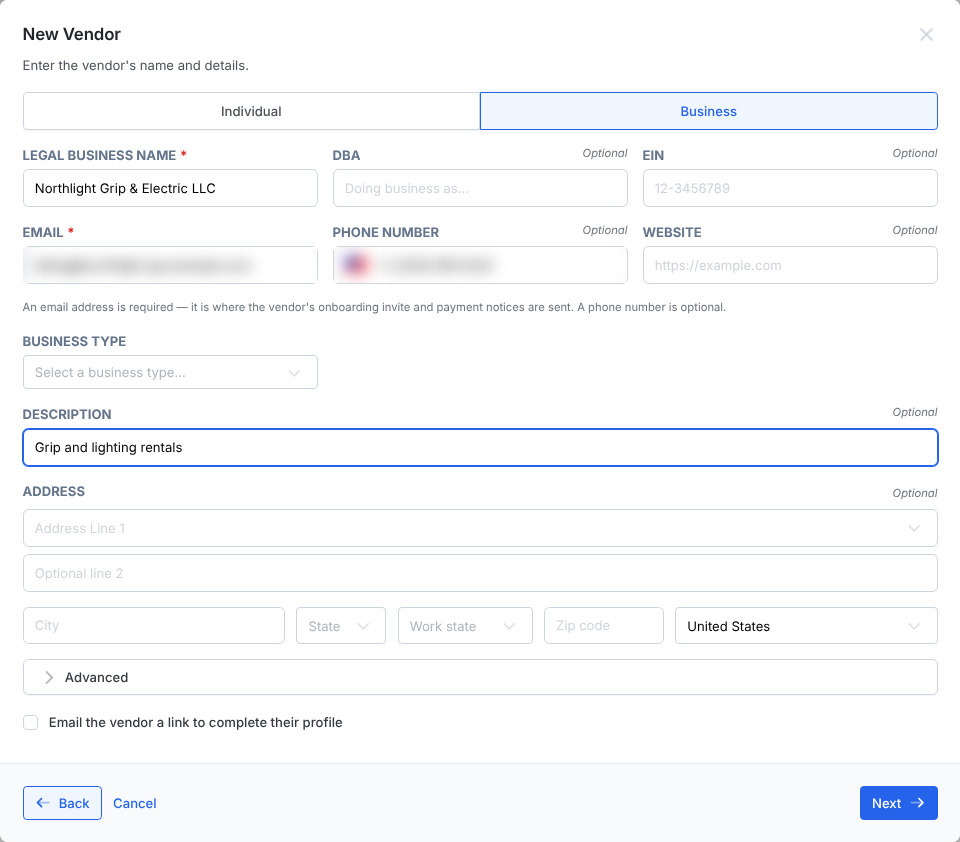
- Pick a business or an individual. A business needs a Legal Business Name; an individual needs a first and last name. Add a DBA if they trade under another name.
- Enter the Email. It is required: the vendor’s invite and payment notices go there. A phone number is optional.
- Fill in the rest you have: website, Business Type (sent to Probooks to drive 1099 treatment), description and address.
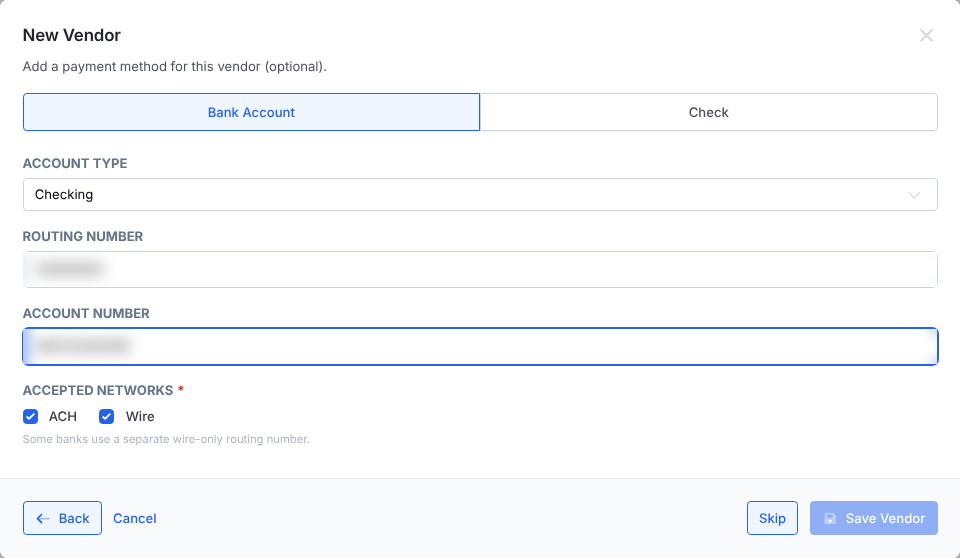
- Choose Next and add a Bank Account or Check payment method, or choose Skip to save without one.
- Choose Save Vendor. If vendor approval is on, the button reads Save and Send for Approval or Save as Draft.
Tick Email the vendor a link to complete their profile if you want the vendor to add anything you are missing, such as their W-9.
Import from Probooks
With the Probooks integration on, New vendor → Import from Probooks shows every Probooks vendor not yet in Dolly. Nothing is imported until you confirm. The What happens column says whether each one becomes a New vendor, Links to a vendor already in Dolly, or would be a New duplicate vendor. A Probooks vendor without an email needs one typed in before it can come over.
Not seeing a vendor? Choose Sync again to refresh the list, or check whether it is already on your Vendors page.
Import a vendor list
To add many vendors at once, drop a CSV, TSV or Excel file on Import a vendor list. Dolly reads your column names, shows how it mapped them, and lets you fix a row before anything is created.
Advanced fields
Under Advanced you will find P-Card Account, Reimbursement Account and Payroll Account. They hold the vendor’s account number in your accounting system for those kinds of spend. Tick Diverse vendor and give a reason if you track diverse spend.
Frequently asked questions
- Do all vendors have to onboard themselves?
- No. A vendor only gets an email if you request information from them or tick the box to email them a link. If you fill everything in yourself or import from Probooks, the vendor does nothing.
- Can I add a vendor without an email address?
- No. Dolly needs an email for every vendor, because that is where onboarding links and payment notices go. Use the vendor’s accounts or billing address if you have no named contact.
- The Probooks import failed or skipped a vendor. Why?
- The usual reasons are a missing email, or a vendor already in Dolly. Add the email on the import screen, or search the Vendors page for the existing vendor. If a vendor is linked to the wrong Probooks vendor, contact Dolly Support.
- Why is my new vendor a draft?
- Your workspace requires vendor approval. Open the vendor and choose Submit for approval. If the message says an approval workflow must be configured, set one up in Settings → Approvals.
Keep reading
Get cards to your crew in as little as 24 hours.
Dolly issues controlled cards to every department, codes each charge to your budget, and keeps spend audit-ready as it happens.