For Admin & Accounting
Wrapping a Production in Dolly
The short answer
When spending is done, go to Settings → Account → Wrap Production and choose Mark as Wrapped & Generate Archive. Dolly pauses every open card and emails you an archive of envelopes, transactions, crew and the chart of accounts.
Before you do, get the last charges into approved envelopes and let pending holds post. After it, send what is left in the account back to your bank from Funds, and remove anyone who has left.
The wrap checklist
- Tell crew the last day to spend. Pause cards as people finish rather than closing them. A paused card can still take a return.
- Get every charge into an envelope. Chase missing receipts and coding, then approve and post the last envelopes. A crew member who lost a receipt can fill in the missing receipt form from the charge.
- Wait for pending holds to post. Hotels, car rentals and tips can post days or weeks after the last swipe. See Charges That Show Up After Wrap.
- Mark the production as wrapped. This pauses the cards that are still open and builds the wrap archive (below).
- Send the balance back to your bank. In Funds, choose Move funds. Pick your Dolly balance under Transfer from and your bank under Transfer to.
- Take people off the production who no longer need it, so their access and emails stop.
Mark the production as wrapped
Go to Settings → Account. Under Wrap Production, choose Mark as Wrapped & Generate Archive. Only admins who manage the production see this.
Three things happen. The production’s status changes to Wrapped. Every open card is paused. And Dolly starts building the wrap archive. It usually takes a few minutes and is emailed to you when it is ready, so you can leave the page.
A wrapped production leaves the main list in the workspace switcher at the top left. Open the Wrapped section of the switcher to get back to it.
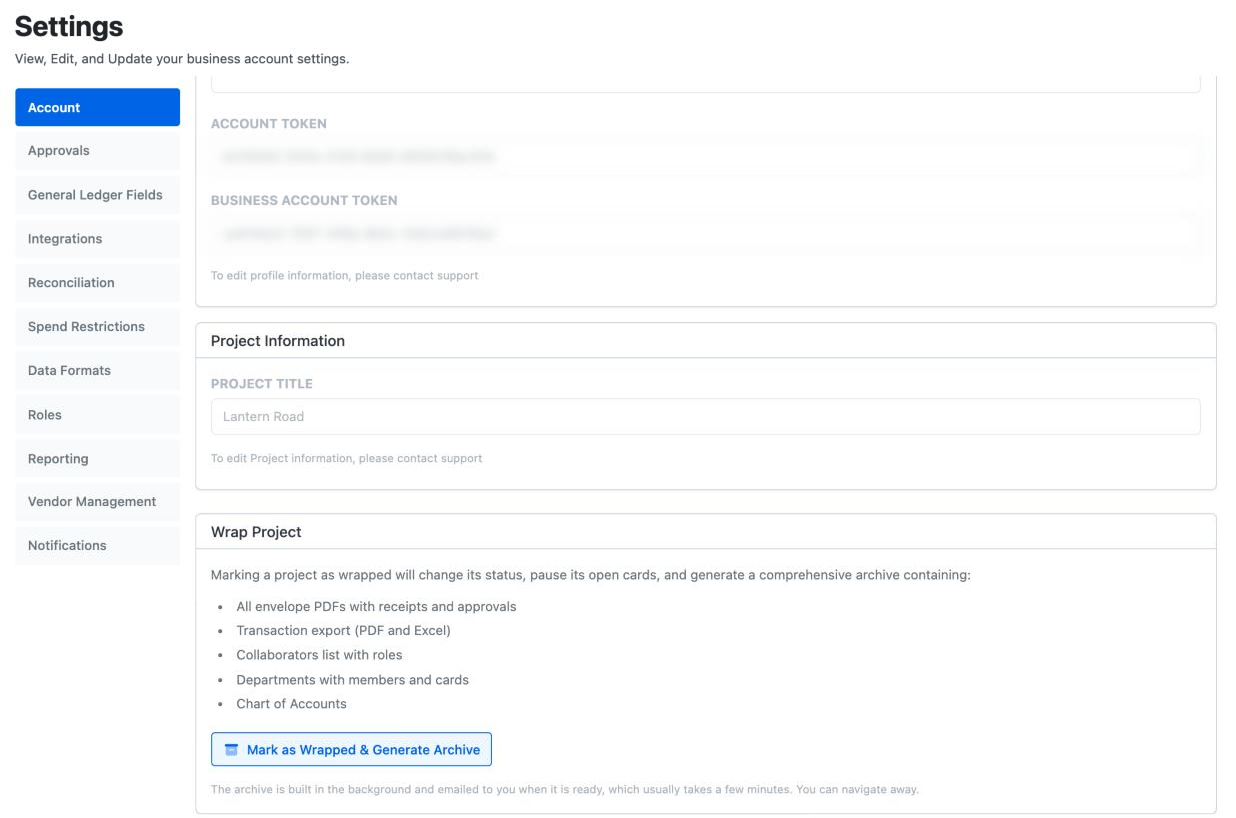
What is in the wrap archive
- Every envelope PDF, with its receipts and approvals
- The transaction export, as a PDF and an Excel file
- The collaborators list with each person’s role
- Departments, with their members and cards
- The chart of accounts
To get it again later, come back to Settings → Account and choose Download Wrap Archive Again. It returns the archive already built. If anything changed since, such as a late charge or a reposted envelope, choose Regenerate archive and a fresh one is emailed to you.
Pause or close?
| Pause | Close | |
|---|---|---|
| New purchases | Stopped | Stopped |
| Charges approved before | Still post | Still post |
| Returns | Still come back to the card | May not be accepted on newer cards |
| Can you undo it? | Yes, Resume Card | No. Closing is permanent |
Both are under Card Controls on the card page. Dolly asks before it closes a card and offers Pause Instead.
Pausing is the safer choice at wrap. Close a card only once you are sure nothing else is coming back to it, or if it was lost or stolen.
Sending the balance back
What is left in the production’s Dolly balance is the production’s money. Send it to your bank from Funds → Move funds, or from the bank’s own card under Linked Accounts (Transfer → Transfer out; on some accounts, Out of Dolly Card). A transfer Dolly sends usually takes 2 to 6 business days to arrive.
Leave enough behind for holds you are still expecting. A hotel that posts after the account is empty is still owed.
If no bank was ever linked, link one first. See Linking and Verifying Your Bank Account. If you can’t, contact Dolly Support and we will help you get the money out.
Taking people off the production
Go to Crew & Departments, open the person and choose More Actions → Remove Collaborator. Dolly takes away their access to the production and takes them off their cards, departments, roles and approval steps. Past approvals still show their name. Removing someone does not pause or close a card, so do that from Card Controls.
If an envelope was waiting on an approver you removed, add someone else to that step in Settings → Approvals. See Approvals in Dolly.
Anyone can turn off Dolly emails for themselves in Settings → Notifications → Individual Settings, or from the unsubscribe link at the bottom of an email.
Frequently asked questions
- Does wrapping close the cards?
- No. It pauses every open card. Paused cards still take returns and can be resumed if you re-open the production. Close a card yourself from Card Controls only once nothing else is coming back to it.
- Can I still see a production after it is wrapped?
- Yes. Open the Wrapped section of the workspace switcher. Everything is still there, and the wrap archive can be downloaded again from Settings → Account.
- A charge posted after we wrapped. What do I do?
- Expected for hotels, rentals and tips. Code it and put it in an envelope as usual. Regenerate the wrap archive afterwards so it includes the charge. If nobody recognizes it, contact Dolly Support.
- How do I stop the weekly emails from a show that wrapped?
- Each person can turn them off in Settings → Notifications → Individual Settings, or with the unsubscribe link at the bottom of the email. For people who left the production, an admin can also remove them in Crew & Departments, which takes away their access.
- We never linked a bank. How do we get the money back?
- Link a bank from Funds, then use Move funds. If that isn’t possible, contact Dolly Support.
Keep reading
Get cards to your crew in as little as 24 hours.
Dolly issues controlled cards to every department, codes each charge to your budget, and keeps spend audit-ready as it happens.