For Admin & Accounting
Linking and Verifying Your Bank Account
The short answer
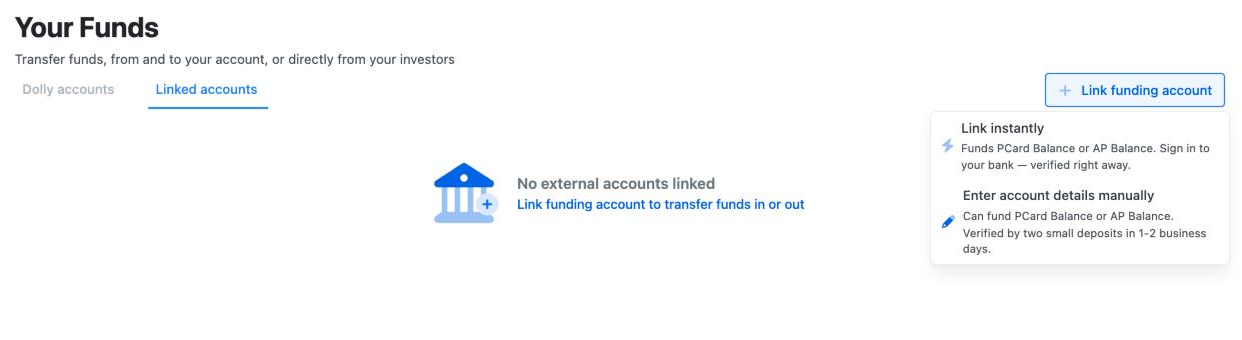
Go to Funds and choose Link funding account. Link instantly signs in to your bank and verifies it right away. Enter account details manually takes the routing and account numbers, then Dolly sends small test deposits in 1–2 business days. Enter them on the bank’s card in Funds to finish.
You don’t need a linked bank to add money. A wire or ACH from your bank works without one.
Do you need to link a bank?
A linked bank lets you move money between it and Dolly from Funds, in either direction. It is how you pull money in without a trip to your bank’s website, and how you send the balance back at wrap.
You can always add money without one: send a wire or ACH to the routing and account numbers shown in Funds. See Adding Money to a Production Account.
Only admins who manage the production see Funds.
Two ways to link
| Link instantly | Enter account details manually | |
|---|---|---|
| How | Sign in to your bank in a secure window. | Type the routing and account numbers. |
| Verified | Right away. | After you confirm the test deposits, 1–2 business days later. |
| Good for | Most banks with online banking. | A bank that won’t link, or when nobody has the online login. |
Some accounts only offer manual entry. Then the button just says Link funding account.
Entering the details by hand
- In Funds, choose Link funding account → Enter account details manually.
- Pick the Owner Type (a business or an individual) and the Account Type, and give it an Account Nickname you will recognize.
- Enter the 9-digit Routing Number and the Account Number. Use the numbers for ACH. Some banks use a different routing number for wires.
- Add the legal name and address on the account (and a date of birth for an individual), then choose Link Funding Account.
Dolly confirms with Bank Account Added Successfully and gives you a date to confirm the deposits by, 7 days out.
Confirming the test deposits
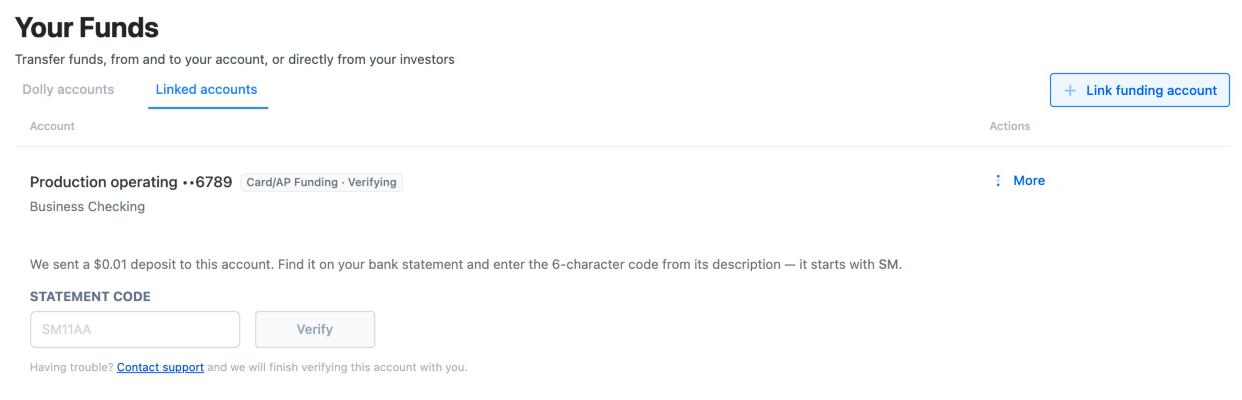
Watch your bank account over the next 1–2 business days. Then open Funds, find the bank under Linked Accounts, and enter what arrived. There are two kinds, and the bank’s card shows the boxes for the one you got:
Two small deposits. Enter each amount in cents, in First Deposit and Second Deposit. A deposit of $0.32 is 32. The order doesn’t matter.
One $0.01 deposit with a code. Look at the deposit’s description on your statement for a 6-character code that starts with SM, and enter it in Statement code.
What the bank’s status means
| You see | What it means |
|---|---|
| Boxes for deposits or a statement code | Waiting on you to confirm the test deposits. |
| Verifying this bank | Dolly is still confirming it. Nothing is needed from you. |
| Ready for bank transfers | Done. Move money in or out from Funds. |
| Card funding only | Done. This bank funds your cards. It isn’t set up to pay vendors. |
| Account verification failed | Dolly couldn’t verify it. Contact Dolly Support. |
When it doesn’t work
- The deposits never came. Give it 2 business days, and check that the routing and account numbers were right. If they were wrong, remove the bank from the bank’s card (More → Remove bank) and add it again.
- Dolly says the amounts are wrong. Check you typed cents, not dollars, and that you are reading the deposits from Dolly, not another service. Entering wrong amounts too many times fails the verification.
- Account verification failed. Contact Dolly Support. We can finish verifying it with you, or help you link another account.
- Your bank won’t link instantly. Use Enter account details manually instead.
Click through it yourself
Frequently asked questions
- Who can link a bank account?
- Admins who manage the production. Funds isn’t shown to anyone else.
- How long does verification take?
- Link instantly is verified right away. Manual entry takes 1–2 business days for the test deposits to arrive, then it is verified as soon as you enter them.
- Do I enter the deposits in dollars or cents?
- Cents. A deposit of $0.07 is 7.
- Can I add money before the bank is verified?
- Yes. A wire or ACH sent from your bank to the details in Funds doesn’t need a linked bank.
- Can I link more than one bank?
- Yes. Each one appears under Linked Accounts, and you pick which one to use when you move money.
Keep reading
Get cards to your crew in as little as 24 hours.
Dolly issues controlled cards to every department, codes each charge to your budget, and keeps spend audit-ready as it happens.