Everyone
Emails and Texts Dolly Sends, and How to Change Them
The short answer
Dolly texts cardholders about their own charges, and emails people about approvals, reports, comments and balances. To turn an email off for yourself, use the unsubscribe link at the bottom of it, or go to Settings → Notifications → Individual Settings. Reply STOP to any text to stop texts.
Admins choose who gets the weekly reports in Settings → Reporting, and who gets decline and low balance alerts in Settings → Notifications.
Texts to cardholders
| Text | When | What to do |
|---|---|---|
| A charge | Each time the card is used. | Reply with a photo of the receipt, or reply Fraud if it isn’t yours. |
| A purchase check | Before Dolly approves a purchase that looks unusual. | Reply YES if it was you, then try the purchase again. |
| A decline | When a purchase is declined. | The text gives the reason. Text “why was I declined?” for more. |
| What a charge still needs | After a charge, if it is missing a receipt, coding or a description. | Reply with what it asks for. |
| An answer to your request | When an admin decides on something you asked for by text. | Nothing. It is for your information. |
Texts go to the phone number on the card. Reply STOP to stop all texts, including declines, and START to turn them back on. See Texting Dolly.
Emails, by who gets them
| Who gets it | What it is | |
|---|---|---|
| Cardholder settlement | Cardholders, if an admin turned it on | Each week’s settled charges on your card, with a PDF. |
| Department settlement | Department heads or members, if an admin turned it on | Each week’s totals for the department. |
| Unreconciled transactions reminder | Cardholders, if an admin turned it on | Charges still missing a receipt, coding or a description. Often daily near wrap. Reply with receipts attached and Dolly files them. |
| Weekly envelope action reminder | Cardholders | Last week’s charges that are not in an envelope yet. |
| Weekly card pause reminder | Cardholders | Sent 12 hours before the end-of-week pause. |
| Envelope pending approval | Approvers | An envelope is waiting for you. |
| Envelope reopened | The person who sent the envelope | It was kicked back for changes. |
| Mentions and Comment resolved | The person mentioned, or the comment’s author | Someone mentioned you, or resolved your comment. |
| Receipt notifications | Whoever emailed in a receipt | Whether Dolly matched it to a charge. |
| Declined transactions | The cardholder and the production’s decline notice recipients | Sent right away when a purchase declines. |
| Low balance alerts | The production’s alert recipients | The balance has dropped below the threshold. |
| Transaction summary | Admins an admin chose | A daily or weekly summary of card activity, with a PDF. |
Turning emails off for yourself
Every email you can turn off has an unsubscribe link at the bottom. It opens Settings → Notifications with that email highlighted and already off.
You can also go to Settings → Notifications → Individual Settings at any time. Each email has its own switch, grouped into Approvals, Reports, Card activity, Vendors and Collaboration. Deselect all turns off every email you are allowed to. These settings are per production and only affect you.
Declined transactions can’t be turned off, because a decline usually needs action straight away.
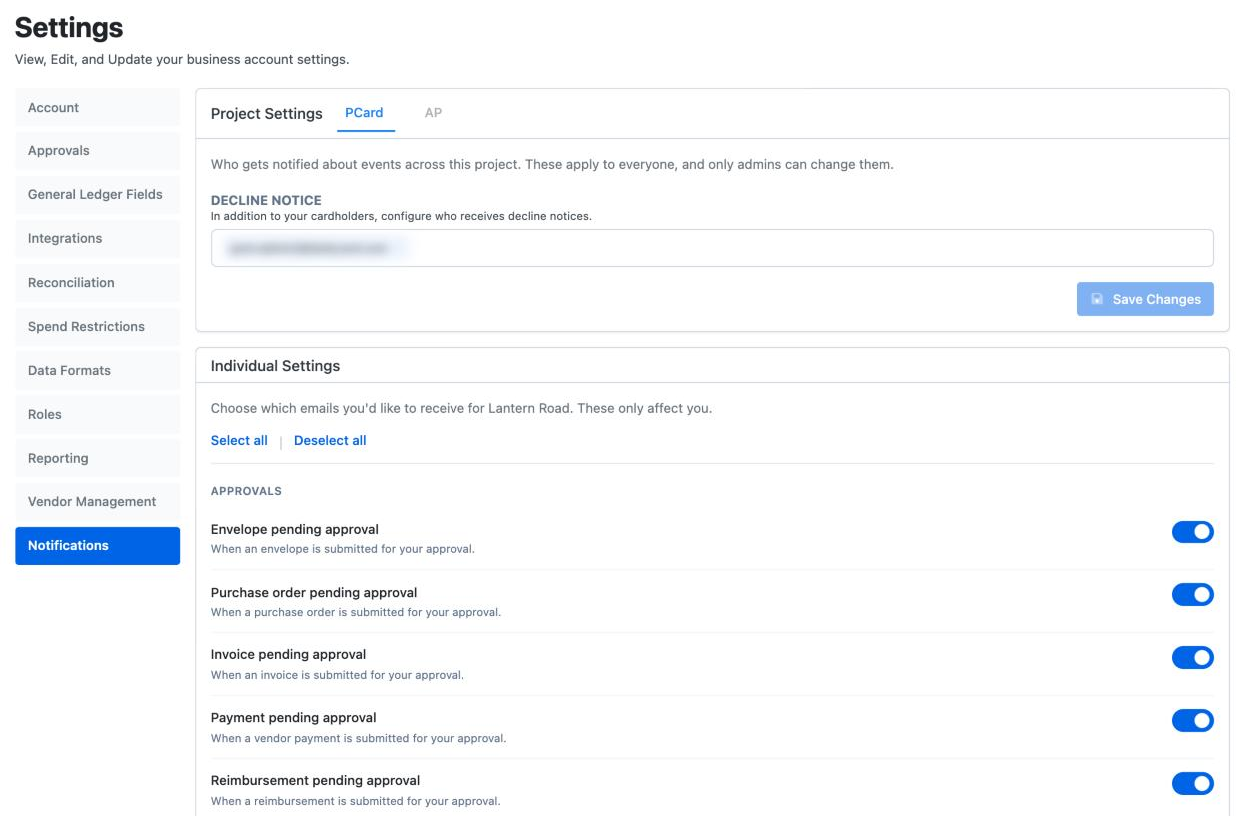
For admins: who gets what
- Weekly reports. In Settings → Reporting → Transactions, the Cardholder Report and Department Report tabs turn the weekly settlement emails on and choose who gets them. Unreconciled and Old Transactions send each cardholder their own list on the cadence you pick.
- Your own reports. Add Report sends a saved custom report to anyone you choose, on a schedule.
- Decline notices. In Settings → Notifications → Production Settings, add the emails that should hear about declines as well as the cardholder.
- Low balance alerts. In the same section, set the threshold and the Alert recipients. If you have a linked bank, you can also tick Automatically pull in to top up the balance when it runs low.
Someone left the show and still gets emails
They can unsubscribe from the link in the email. To stop everything at once, an admin removes them from the production in Crew & Departments with More Actions → Remove Collaborator. If they still hold a card, pause or close it too, so charge texts and cardholder reports stop. See Wrapping a Production in Dolly.
Frequently asked questions
- Why do I get a weekly settlement email?
- Your production’s admins turned on the Cardholder Settlement Report in Settings → Reporting. It lists the week’s settled charges on your card. Turn it off for yourself with the unsubscribe link.
- A week’s settlement email never came. Where can I get it?
- Admins can download any week from Statements. Crew can see their charges on the card page and on Transactions.
- Can I reply to a Dolly email?
- Two kinds take replies. Reply to a comment email and your answer posts as a comment (attachments aren’t saved). Reply to the unreconciled transactions reminder with receipts attached and Dolly files them. Replies to other Dolly emails go to Dolly Support. See Answering Your Accountant.
- I turned off texts by mistake. How do I get them back?
- Text START to the Dolly number.
Keep reading
Get cards to your crew in as little as 24 hours.
Dolly issues controlled cards to every department, codes each charge to your budget, and keeps spend audit-ready as it happens.