For Admin
Roles and Permissions: Who Can See and Do What
The short answer
Everyone on a production has Admin or Crew permission. Admins run the production: cards, limits, funds, settings and everyone’s charges. Crew see the cards they hold or are assigned to, and approve envelopes they are an approver on.
To let someone work on cards that aren’t theirs, add them to the card’s department or as an Additional reconciler on the card. Roles are names, such as UPM or Key Accountant, that you use in approval steps. Manage all of this in Crew & Departments.
Admin and Crew
| Admin | Crew | |
|---|---|---|
| Issue cards, change limits, pause cards | Yes | No |
| See every card and charge on the production | Yes | Only cards they hold or are given |
| Code charges and add receipts | Any card | Cards they hold or are given |
| Approve envelopes | When they are an approver | When they are an approver |
| Funds, Settings, Chart of Accounts setup | Yes | No |
| Invite and remove people | Yes | No |
An approver does not need Admin permission. A producer who only approves envelopes can have Crew permission and still approve.
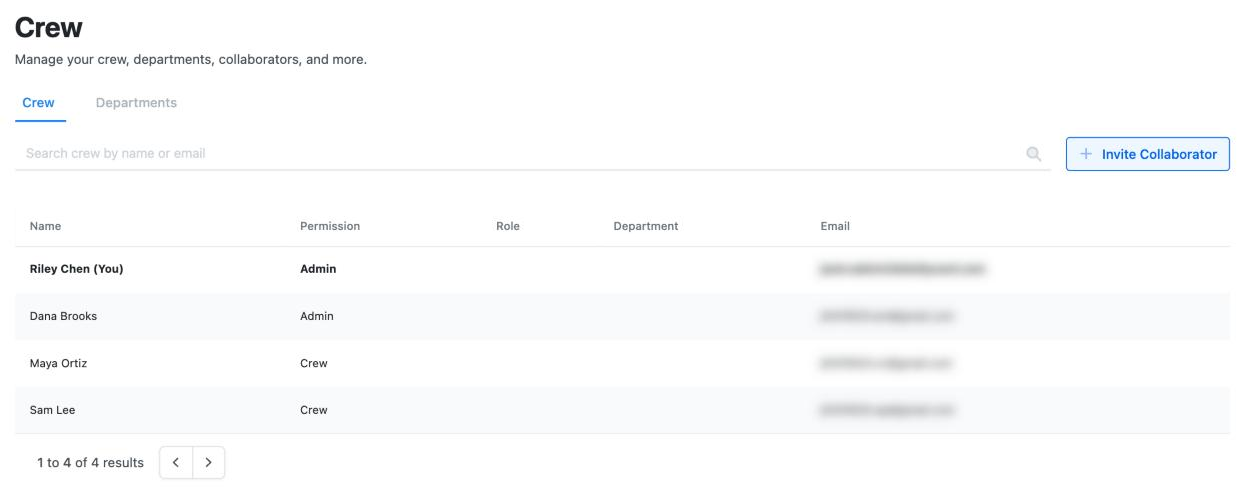
Adding someone who has no card
Accountants, producers and assistants often need Dolly without a card of their own.
- Go to Crew & Departments and choose Invite Collaborator.
- Enter their email and pick Admin Permission or Crew Permission.
- They get an email to set up their sign-in. Until they accept, their row shows as invited and you can choose Resend Invite from it.
- Open their row to add them to a department, give them a role, or assign cards.
Anyone can ask to be added. An admin on the production has to send the invite.
Giving access to someone else’s cards
| To let someone | Do this |
|---|---|
| Code and add receipts on every card in a department, such as an art department coordinator | Add them to the department as a Member in Crew & Departments → Departments. Members can reconcile the cards assigned to that department. |
| Run a department: see its cards and approve as department head | Make them the Department Head. Approval steps can name the Department Head instead of a person. |
| Reconcile one card for its cardholder, such as an assistant for a producer | On the card page, add them under Additional reconcilers. |
| Create purchase orders and invoices for a department | Turn on AP Access for the department. This only appears if your production pays vendors in Dolly. |
None of these let someone change a card’s limit or pause it. That stays with admins.
Roles
A role is a name you give to a job, such as UPM, Production Accountant or Key Accountant. Create them in Settings → Roles, then give people a role from their row in Crew & Departments.
Roles matter in approvals. A step can be approved by a role instead of a named person, so when the UPM changes, you change who has the role and every approval flow keeps working. See Approvals in Dolly.
A role can only be deleted once nobody holds it and no approval step uses it.
Studios: people who can see every production
Someone added to the studio on its Team page can see every production and project under that studio. Studio admins can manage all of them. This is the usual reason someone “suddenly sees the whole production”: they were added at the studio level, or given Admin permission.
To give someone only one production, invite them from that production’s Crew & Departments, not from the studio.
Changing or removing access
To change someone’s permission, open their row in Crew & Departments and pick a new Permission.
To remove someone, open their row and choose More Actions → Remove Collaborator. They lose access to the production and come off their cards, departments, roles and approval steps. Their past approvals still show their name. You can’t remove yourself. Ask another admin.
Removing someone doesn’t pause or close their card. Do that from Card Controls on the card.
Frequently asked questions
- Can a department head change their crew’s card limits?
- No. Department heads can see and reconcile their department’s cards and approve as department head. Limits, pausing and issuing stay with admins.
- Our accountant has no card. How do they get in?
- An admin invites them from Crew & Departments with Invite Collaborator. Accountants often get Admin permission.
- Can an assistant upload receipts for their boss?
- Yes. Add the assistant under Additional reconcilers on the boss’s card. They can then code it and add receipts.
- Someone left the show. How do I stop their emails?
- Remove them with More Actions → Remove Collaborator in Crew & Departments. That takes away their access to the production.
- Who can pay vendors?
- Only admins can send a vendor payment. To make sure nothing is paid without you, add yourself as an approver on payments in Settings → Approvals. Every payment then needs your approval, including ones other admins send.
Keep reading
Get cards to your crew in as little as 24 hours.
Dolly issues controlled cards to every department, codes each charge to your budget, and keeps spend audit-ready as it happens.