For Admin
Spend Restrictions and Reconciliation Rules
The short answer
Two settings pages hold the production’s rules. Settings → Spend Restrictions decides where cards can be used and when they pause: blocked merchants and categories, category limits, and auto-pausing after unreconciled charges or at the end of the week. Settings → Reconciliation decides what a charge needs before it counts as reconciled: account coding, a receipt, a description, and whether a missing receipt reason is enough.
Each has a Default Rule for everyone, and you can add rules for particular cards or departments.
Blocking merchants and categories
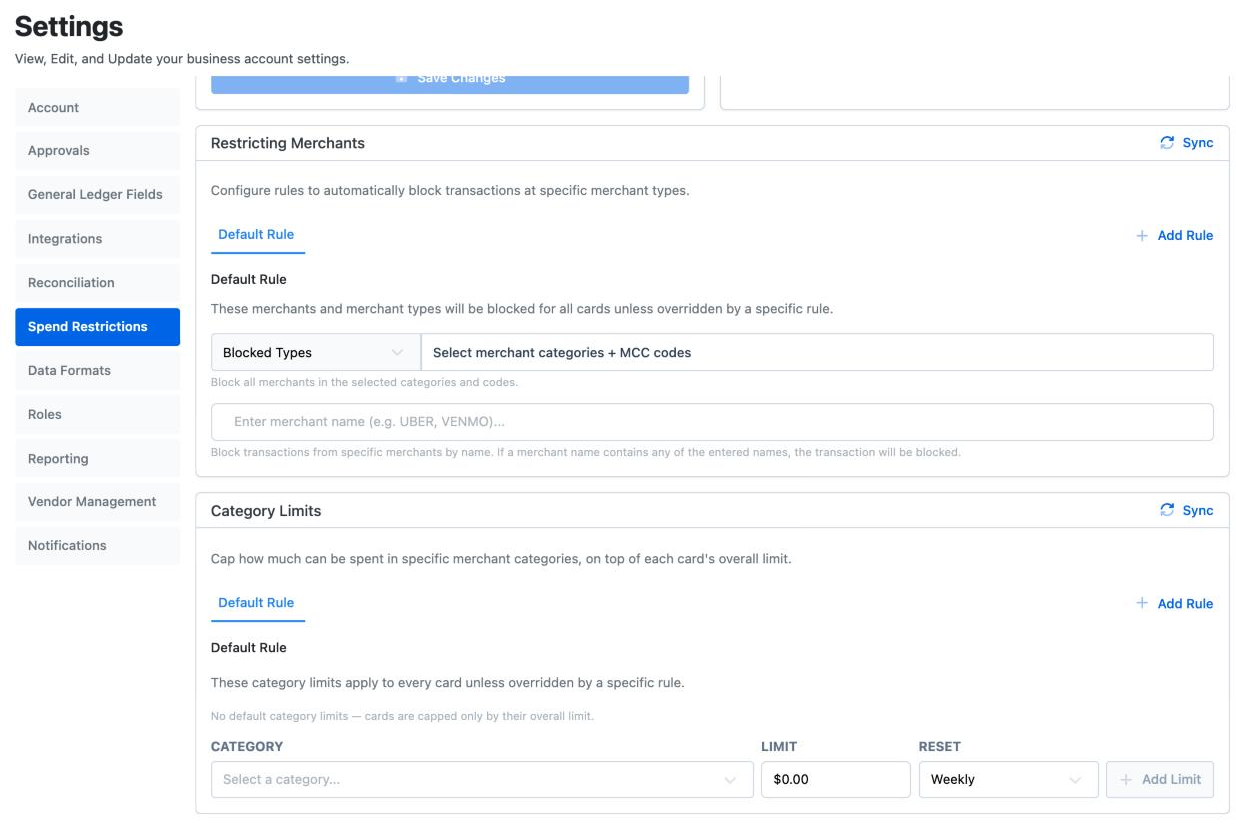
Go to Settings → Spend Restrictions → Restricting Merchants. On the Default Rule, choose merchant categories to block, such as casinos or cash-like services. You can switch it around and allow only the categories you pick, which suits a card meant for one kind of spend.
To block one store, type its name. A purchase is declined if the merchant’s name contains any name on the list, so UBER blocks every Uber charge.
Changes save as you make them and apply to the next purchase.
Different rules for some cards
Choose Add Rule to give certain cards or departments their own restrictions. A rule overrides the Default Rule for the cards it names. Copy from Default starts it from the default lists so you only change what is different, such as letting the transportation department’s cards buy fuel.
Category limits
Under Category Limits, set the most a card can spend in a category, such as $500 a week on restaurants. Choose Add Limit, pick the Category, the Limit and how often it Resets. Use Add Rule for different limits on some cards or departments.
Auto-pausing cards
| Option under Restricting Spend | What happens |
|---|---|
| Never | Cards are only paused by an admin. |
| After [number] unreconciled transactions | A card pauses once that many of its charges are missing coding, a receipt or a description. It resumes when they are reconciled. |
| End of Week (Sundays at 11:59 PM ET) | Cards pause every week. Tick Unless or until envelope submitted for the week to skip or lift the pause for crew who sent their envelope. |
Dolly emails cardholders a reminder 12 hours before the weekly pause.
An admin can resume a paused card early from Card Controls. See Managing Cards.
What a reconciled charge needs
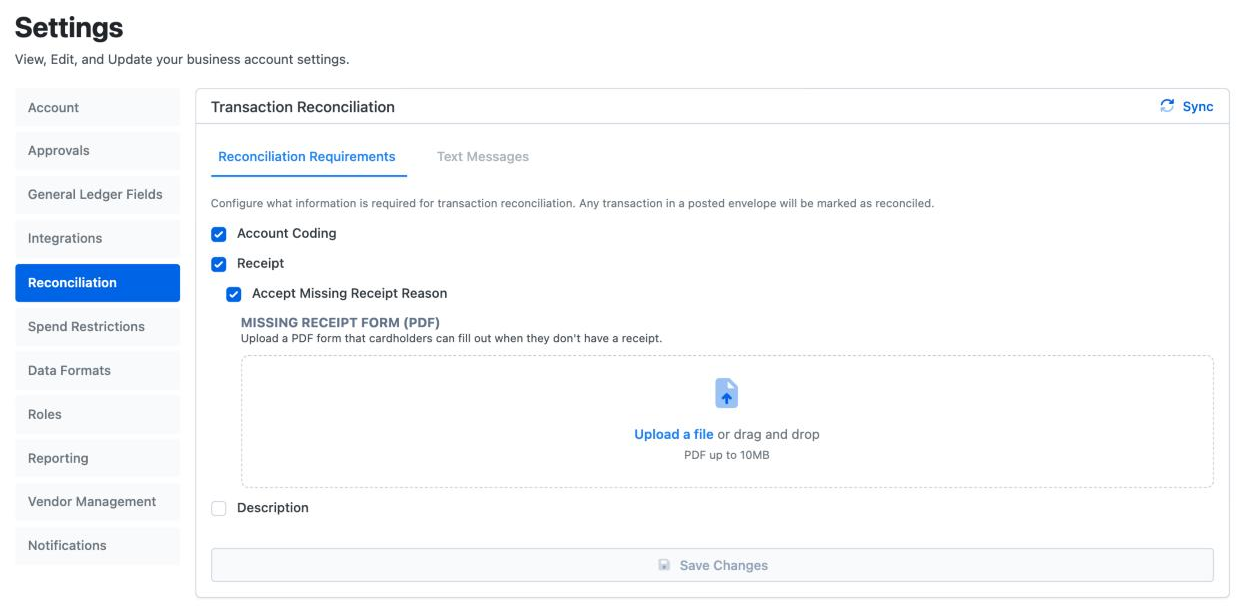
Go to Settings → Reconciliation → Reconciliation Requirements and tick what every charge must have:
- Account Coding: an account code from your chart of accounts.
- Receipt: a receipt attached.
- Accept Missing Receipt Reason: lets crew explain a missing receipt instead. Upload a Missing Receipt Form (PDF) if your production uses its own form, and crew fill it in from the charge.
- Description: a line description.
A charge in a posted envelope is always counted as reconciled.
What Dolly asks for by text
When a charge posts, Dolly texts the cardholder for what is missing. On the Text Messages tab, Request all reconciliation requirements via text asks for everything above. Untick it to ask for less by text, such as only the receipt, and let crew finish coding on the web. When coding is asked for by text, Display account codes shows each account’s code in the list Dolly sends, in chart of accounts order. See Texting Dolly.
Frequently asked questions
- Crew say a store is blocked but we didn’t block it. Why?
- Some merchant categories are blocked for every Dolly card. See Why a Store Is Blocked. If the store is on your own list, take it off in Settings → Spend Restrictions.
- Can I block one store but not its whole category?
- Yes. Type the store’s name in the merchant list on Restricting Merchants.
- Can one department have different rules?
- Yes. Add a rule for that department on Restricting Merchants or Category Limits. It overrides the Default Rule for those cards.
- Why is a crew member’s card paused every Monday?
- The End of Week option is on. Tick Unless or until envelope submitted for the week so crew who send their envelope aren’t paused.
- Can I copy these settings to another show?
- If you manage more than one show, use Sync on each section to copy it from another of them.
Keep reading
Get cards to your crew in as little as 24 hours.
Dolly issues controlled cards to every department, codes each charge to your budget, and keeps spend audit-ready as it happens.