For Admin
Managing Cards: Pause, Close, Replace and Reassign
The short answer
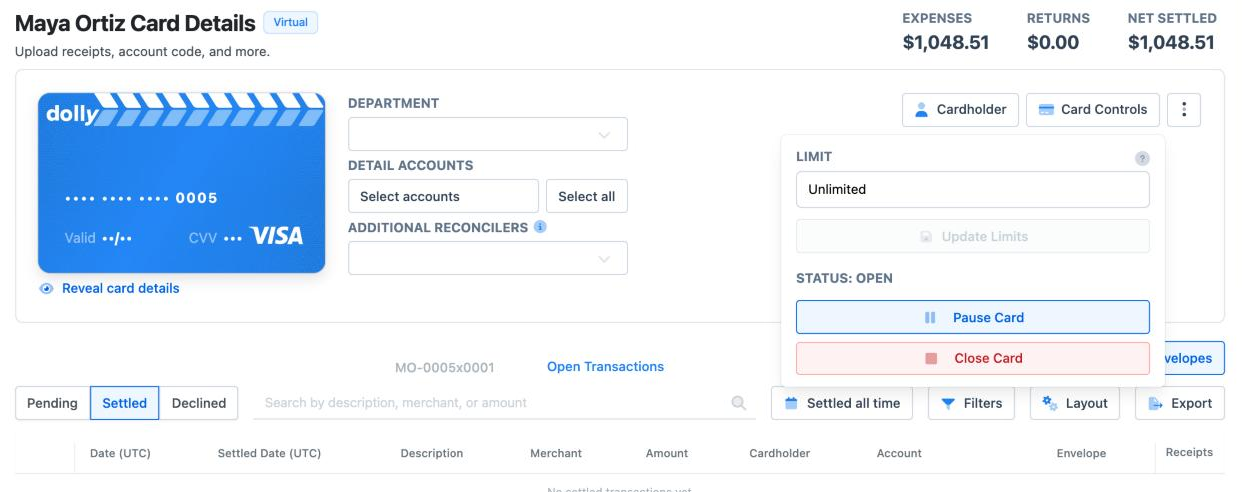
Open the card and choose Card Controls. Pause Card stops new purchases until you Resume Card. Close Card turns the card off for good. To replace a damaged physical card with the same number, use Reissue Physical Card from the card’s menu. For a lost or stolen card, close it and issue a new one.
Limits are set in Card Controls too. A Weekly limit resets every Sunday. A Manual limit only changes when an admin changes it.
Which one do you need?
| Situation | What to do |
|---|---|
| Card misplaced, might turn up | Pause Card. Resume it if it is found and nothing looks wrong. |
| Someone is off for a week | Pause Card, then Resume Card when they are back. |
| Card lost or stolen, or a charge you don’t recognize | Close Card, then issue a new card. Report the charges. See Disputing a Card Charge. |
| Card damaged or chip not working | Reissue Physical Card. Same number, new plastic. |
| Crew member has wrapped | Pause Card until their returns are in, then close it if you like. |
| Card goes to someone else | Change the cardholder (below), or issue the new person their own card. |
Pausing and resuming
On the card page, choose Card Controls, then Pause Card. New purchases decline straight away. Charges approved before the pause still post, and returns still come back.
Choose Resume Card to turn it back on. A card paused because its charges weren’t reconciled shows Override & Resume Card instead. That resumes it before the receipts are in.
The card page shows why a card is paused: Manual, End of week, Unreconciled limit hit, Department limit hit, Fraud reported or Wrapped. Crew can see the reason too. See Why Is My Card Paused?.
Closing a card
Choose Card Controls → Close Card. Dolly asks you to confirm and offers Pause Instead. Closing can’t be undone, and a closed card can’t be reissued.
On newer cards, a closed card can’t take returns, and Dolly warns you about this before you close it. If a return is still coming, pause the card instead.
Replacing a card
- Damaged, worn or expiring physical card: open the card’s menu and choose Reissue Physical Card. Pick the shipping speed and address. The new card has the same number and a new expiry date. The old card keeps working until the cardholder activates the new one, so they are never without a card.
- Lost or stolen card: close it, then issue a new card from Cards. The number changes, so the cardholder has to update anywhere the old card was saved. If they need to spend today, issue a virtual card. It works in a phone wallet straight away.
- Crew theft or misuse: close the card and issue a new one. Report any charges you didn’t authorize to Dolly Support.
- Virtual card that now needs plastic: choose Convert to Physical Card from the card’s menu.
Changing who holds a card
An admin can change the name, email and phone on a card from the Cardholder panel on the card page, under Update Cardholder Information. The new person’s email gets the invite and their phone gets the texts.
The name printed on a physical card can’t change. If the new holder needs a card in their own name, issue them a new one and close or pause the old card.
For a shared or department card, give it a clear name with Edit Card Nickname in the card’s menu, such as “Art Dept Purchasing”.
Limits and when they reset
In Card Controls, set the Limit and how it resets. Weekly starts fresh every Sunday. Hover the option to see the exact time for that card. Manual never resets. The card can spend up to the limit in total until an admin raises it. Choose Update Limits to save. A new limit applies right away.
You can set the limit by what is left to spend now (Available) or by the total (Overall Limit).
A higher limit only helps if the production has the money. See Adding Money to a Production Account.
Allocated, Unallocated and Overallocated
At the top of Cards, Dolly compares the money available for cards with what the cards are allowed to spend. Allocated (Week) and Allocated (Forever) are what cards with weekly and manual limits can still spend. Unallocated is money no card’s limit reaches yet.
Overallocated means the cards’ limits add up to more than the production has. That isn’t an error, and it is common. But if every card spends its full limit, some will decline. Add money, or lower limits you don’t need.
Frequently asked questions
- Does the old card stop working when I reissue it?
- Not until the cardholder activates the new one. A reissued card keeps the same number, so there is no gap.
- Can a card from our last production be used on this one?
- No. A card belongs to one production so its charges land in the right books. Issue a new card on the new production.
- Can I undo closing a card?
- No. Closing is permanent. Pause instead if there is any chance you’ll need the card again or a return is coming.
- When does a new limit take effect?
- As soon as you choose Update Limits. A weekly limit starts over every Sunday. The exact time shows when you hover Weekly.
- Can crew pause their own card?
- Not from Card Controls, which is admin only. A crew member who sees a charge they didn’t make can reply Fraud to Dolly’s charge text, and Dolly pauses the card and tells the admins. For a lost card, tell an admin or contact Dolly Support straight away.
Keep reading
Get cards to your crew in as little as 24 hours.
Dolly issues controlled cards to every department, codes each charge to your budget, and keeps spend audit-ready as it happens.