Everyone
Setting Your Default Production
The short answer
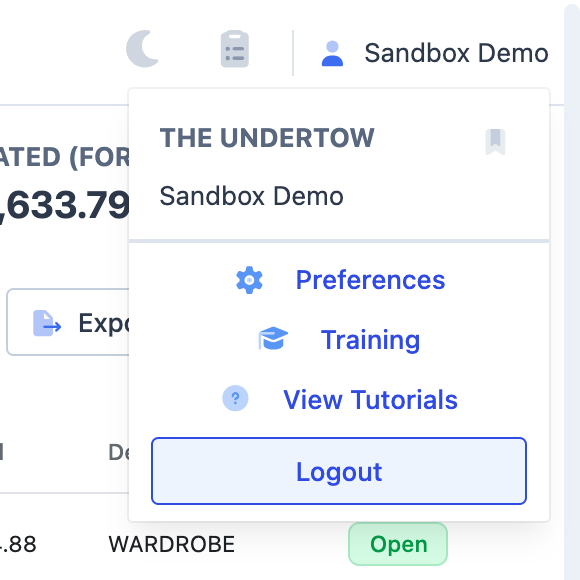
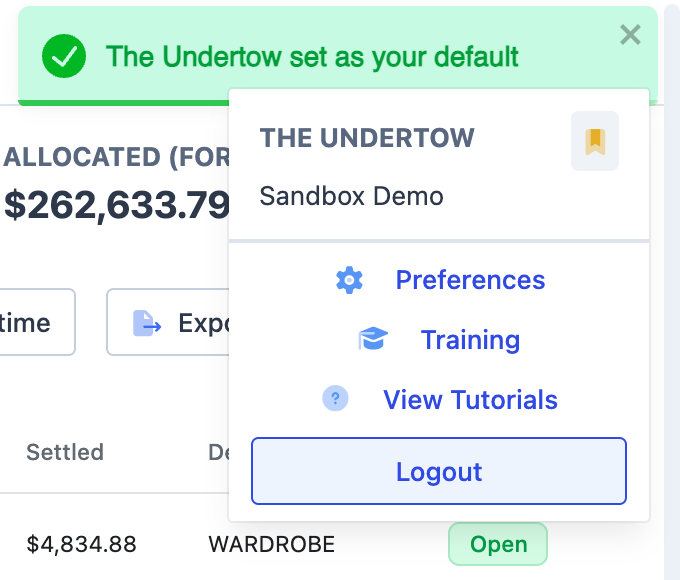
Switch to the show you want in the workspace switcher at the top left. Then open your name at the top right and choose the bookmark next to the show’s name. It turns gold, and Dolly confirms with “[show] set as your default”.
From then on, Dolly opens that show when you sign in. You can still switch to any other show at any time.
Bookmark a production
- Click the show’s name at the top left to open the workspace switcher, and choose the production or project you want Dolly to open to.
- Click your name at the top right. The menu shows the show you are in, with a bookmark beside it.
- Choose the bookmark (it says Set as default when you hover it). It turns gold and a green message confirms the change.
What the default changes
Your default is the show Dolly opens when you sign in. It is only for you. Other people on the show keep their own default.
While you are signed in, Dolly reopens the last show you were working in, so switching shows mid-session doesn’t move you back to the default.
You have one default at a time. Bookmarking another show replaces it. The bookmark on the current default can’t be clicked off, so to change it, bookmark a different show.
Frequently asked questions
- I don’t see a bookmark in the menu.
- The bookmark sits next to the show’s name at the top of the menu under your name. If you only belong to one show, that show is already where Dolly opens.
- Should I bookmark a wrapped show?
- Pick the show you are working on now. Wrapped shows are still in the Wrapped section of the workspace switcher whenever you need them.
Keep reading
Get cards to your crew in as little as 24 hours.
Dolly issues controlled cards to every department, codes each charge to your budget, and keeps spend audit-ready as it happens.