For Admin & Accounting
Requesting Payment and Tax Info from a Vendor
The short answer
Open the vendor and choose Send Onboarding Email (or Resend Onboarding Email). The vendor gets a secure link to a short form: their details, their W-9, and a bank account or check mailing address. The vendor shows Awaiting Vendor Info until they submit. If they cannot use links, enter the details yourself and upload the W-9 they send you.
Send a request
- Open the vendor. Under More Actions, choose Send Onboarding Email.
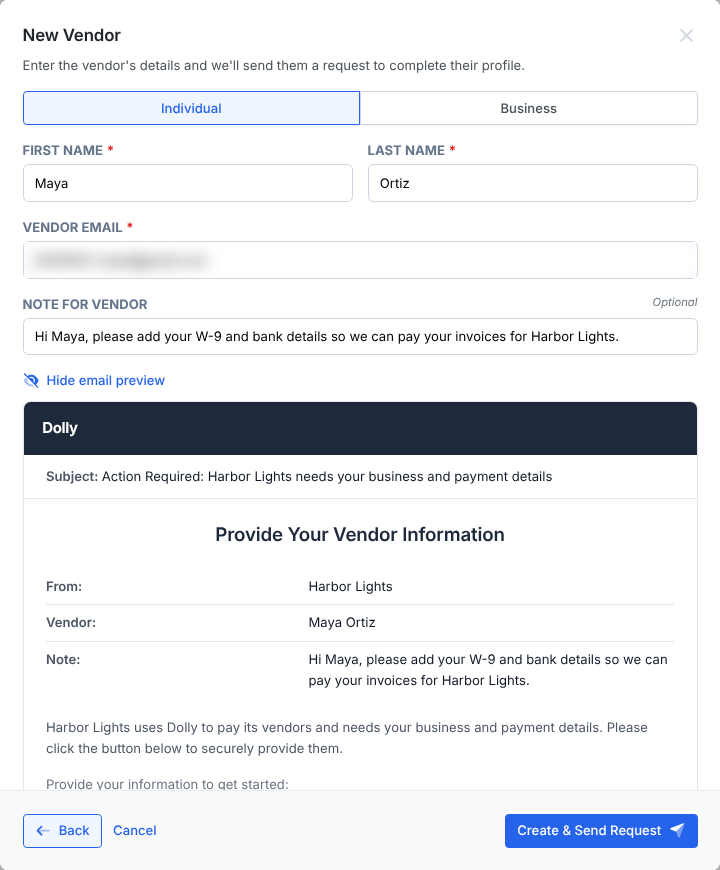
- Add a Note if you want; it goes in the email.
- Choose Send Request. The vendor page shows the open request under Vendor Information Requests.
What you can ask for
| Request | What the vendor fills in |
|---|---|
| Request Vendor Information | Business or individual details, W-9, and a payment method. |
| Request Payment Details | Only a bank account or check mailing address. Choose Ask vendor when adding a payment method. |
| Request Verification | Their legal business name and tax ID, checked by Dolly. |
| Request Payment Confirmation | Whether each payment method on file is theirs. They approve or decline each one. |
What the vendor sees
- Info: legal name, email, address and work state.
- W-9: their EIN or SSN, and a W-9 to upload as a PDF, PNG or JPEG.
- Payment: connect a bank account, enter account and routing numbers by hand, or give a mailing address for checks.
- Review: check everything and choose Submit.
If your workspace requires verification, a Verify step comes first. The full walkthrough from the vendor’s side is in Getting Paid by a Production Through Dolly.
Following up
Choose Bump on an open request to send a reminder. If the link has expired, send a new one; the vendor sees “Link Expired or Invalid” on an old link. Previous Requests keeps a history, including any reason a vendor gave for declining.
Frequently asked questions
- The vendor says the W-9 will not upload from their phone.
- The form takes PDF, PNG or JPEG files. A photo of the form works. If it still fails, have them email it to you and upload it under Documents on the vendor page.
- The vendor only got the W-9 step. Is that right?
- Yes, if you only asked for some details. The steps match what the request asks for.
- Can I see what the email says before it goes?
- Yes. When adding a vendor, choose Show email preview under the request option.
Keep reading
Get cards to your crew in as little as 24 hours.
Dolly issues controlled cards to every department, codes each charge to your budget, and keeps spend audit-ready as it happens.