For Admin & Accounting
Getting Paid by a Production Through Dolly
The short answer
A production that uses Dolly to pay its bills sent you a secure link to enter your details, W-9 and bank account (or a mailing address for checks). It takes a few minutes and there is no account to create. Dolly emails you when a payment is on its way. For payment questions, contact the production that hired you.
Filling in the form
- Verify (sometimes): confirm your business with a short identity check.
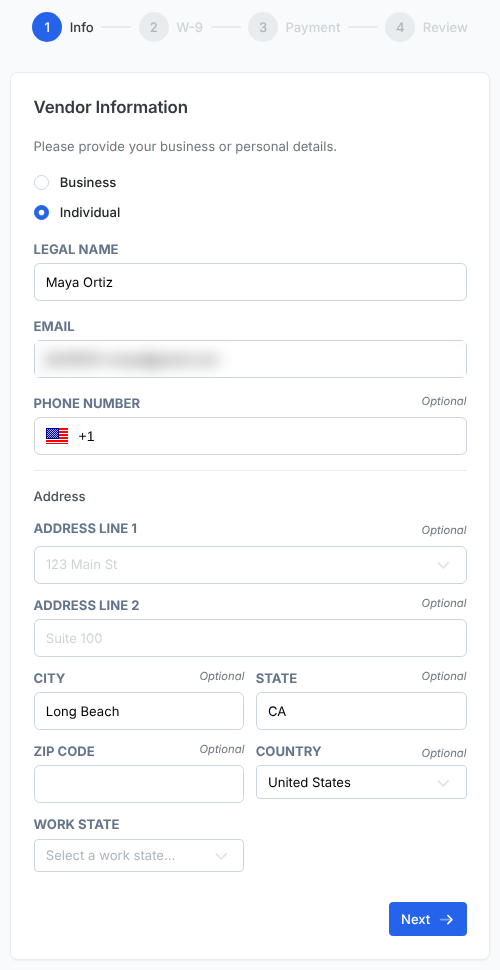
- Info: your legal name, email, address and work state.
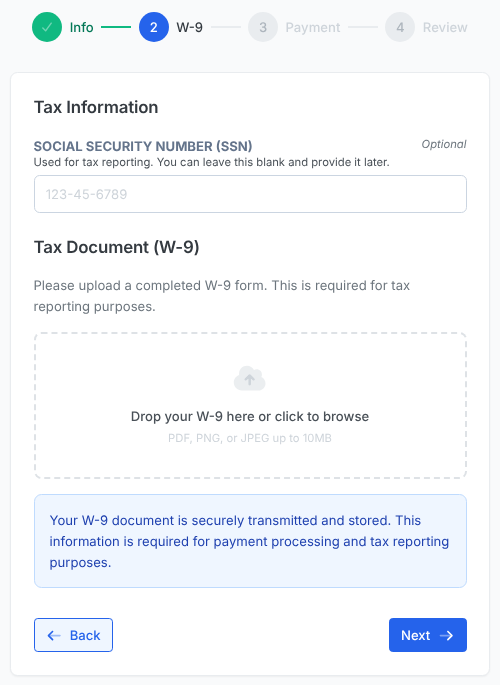
- W-9: your tax ID (EIN for a business, SSN for an individual) and your completed W-9 as a PDF, PNG or JPEG. The tax ID can be left blank and added later, but upload the W-9 now: the production needs it for tax reporting.
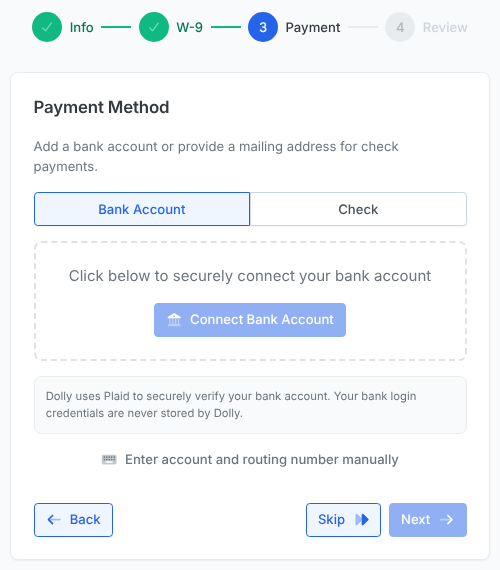
- Payment: connect your bank, enter the account and routing numbers yourself, or add a mailing address for checks. Connecting goes through Plaid, and Dolly never stores your bank login. Choose Bank Country if your bank is outside the US.
- Review: check everything and choose Submit.
When you get paid
The production decides when to pay you. When a payment is on its way, Dolly emails you “Dolly - Payment Processing” with the amount, the payment number and an estimated delivery date. A bank transfer usually arrives 1-2 business days after it is sent.
Dolly cannot tell you when a production will pay an invoice. Ask the production’s accounts team.
Frequently asked questions
- Is this email real?
- The request’s subject reads “Action Required: [production] needs your business and payment details” (or “needs your bank account details”), and names the production that sent it. If you are unsure, check with your contact at the production before entering bank details.
- The link says “Link Expired or Invalid”.
- Links expire. Ask the production to send a new one.
- Our IT team blocks links in emails. What can we do?
- Send your W-9 and payment details to the production directly. They can enter them for you.
- Can I be paid by check?
- Yes. Add a mailing address on the Payment step, or tell the production.
- I got a payment email but don’t work with this production.
- Tell the production named in the email, so they can correct the address.
Keep reading
Get cards to your crew in as little as 24 hours.
Dolly issues controlled cards to every department, codes each charge to your budget, and keeps spend audit-ready as it happens.