Everyone
Reimbursing Crew for Out-of-Pocket Expenses and Mileage
The short answer
Go to Reimbursements in the sidebar and choose Submit Expense. Pick Expense or Mileage, add the details and receipts, split it across accounts if needed, and choose Submit for Approval.
The first time, crew link the personal bank account they want to be paid into. Once a reimbursement is approved, an admin opens it, chooses Pay Reimbursement and sends the payment for approval.
Submit your own expense
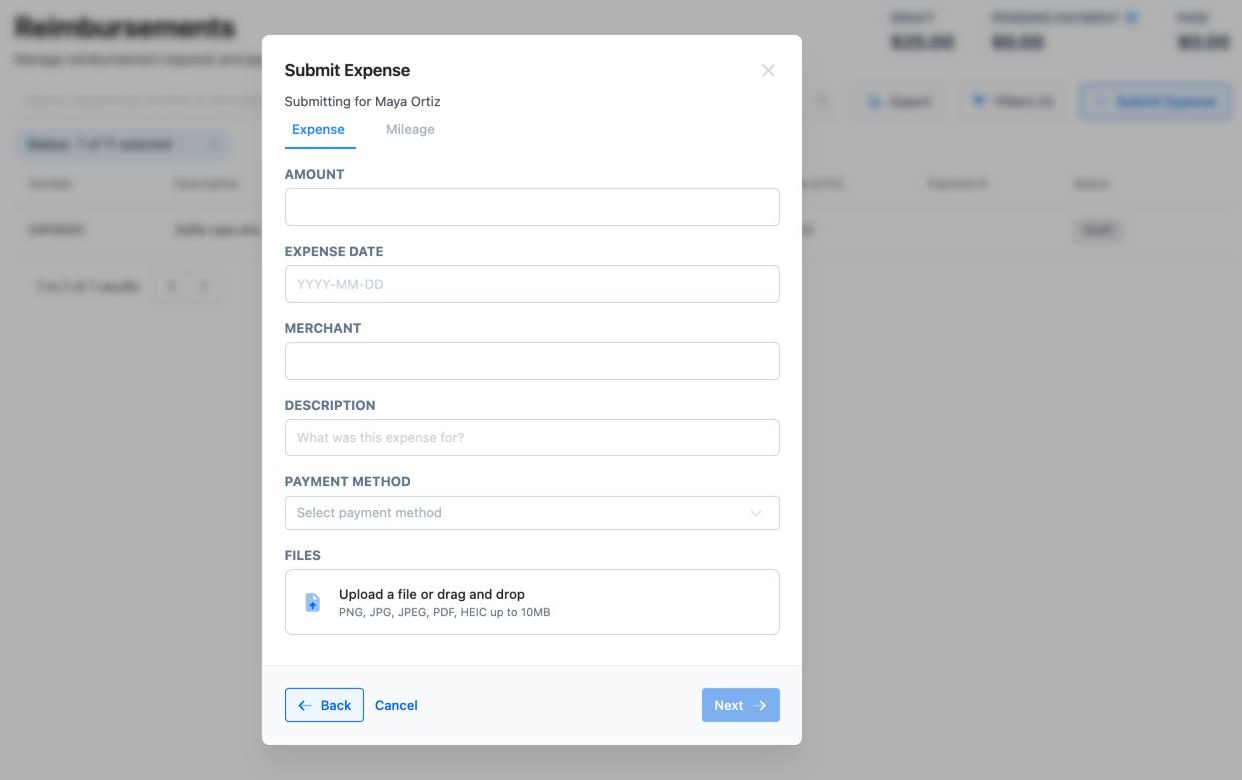
- Go to Reimbursements and choose Submit Expense.
- The first time, Dolly asks for your Personal Bank Account: routing number, account number and account type. Reimbursements are paid into this account.
- Choose Expense or Mileage. For an expense, fill in the Amount, Expense date, Merchant, Description and Payment Method (how you paid: personal card, cash and so on), then add the receipt under Files.
- For mileage, fill in the Travel Date, Start, Destination and Mileage. Enter the total miles, including the drive back. Ticking Roundtrip only notes that you came back. It doesn’t double the miles. Dolly works out the amount at $0.70 a mile.
- Choose Next. On Configure Line Items, code the amount to a Department and Detail Account. Add more lines to split it. The lines must add up to the total.
- Choose Submit for Approval. To finish it later, untick Send for approval and choose Save as Draft.
To check on your claims, go back to Reimbursements. You see only your own. View your information shows the bank account Dolly pays you at.
Submit one for someone else (admins)
- Choose Submit Expense, then pick Existing User or New User and choose the person.
- If they aren’t set up for reimbursements yet, choose Enter details to type in their bank account, or Request by email to send them a form to fill in. You can add a note to the email.
- Fill in the expense or mileage and line items as above, then submit.
What each status means
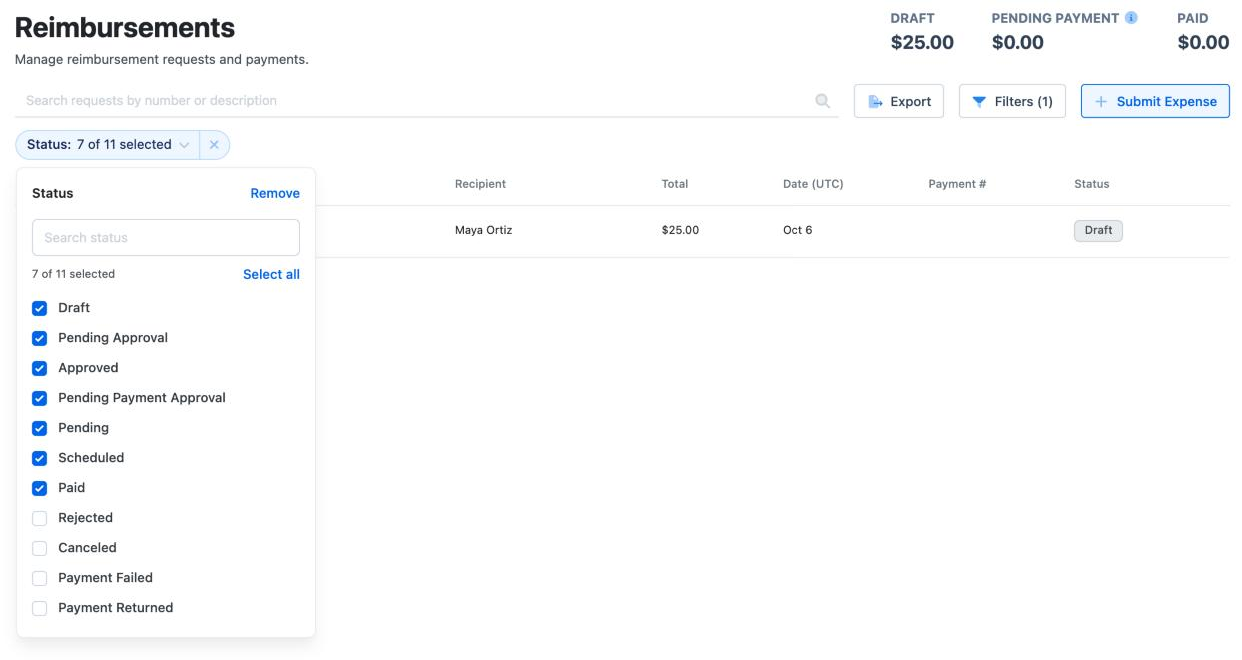
| Status | What’s happening |
|---|---|
| Draft | Saved but not submitted. It can still be edited. |
| Pending Approval | Waiting on the approvers for reimbursement requests. |
| Approved | Ready to pay. An admin still has to create the payment. |
| Pending Payment Approval | A payment was created and is waiting on its approvers. |
| Scheduled / Pending | The payment is approved and on its way to the bank account. |
| Paid | The money has been sent. |
| Payment Failed / Payment Returned | The bank didn’t accept it, usually because of wrong account details. An admin can fix the details and retry. |
| Rejected / Canceled | Not being paid. Submit a new claim if it needs another try. |
Pay an approved reimbursement (admins)
- Open the approved reimbursement and choose Pay Reimbursement.
- Under Select Reimbursements to Pay, tick any other approved claims for the same person to pay them together.
- Choose the Source Bank Account and the Scheduled Date. If Payment Speed is offered, Standard (ACH) is the default. A Same-day wire can’t be canceled once sent and needs the person’s mailing address.
- Choose Send Payment for Approval. Once the payment’s approvers sign off, it goes out on the scheduled date.
If a payment fails or comes back, fix the person’s bank details, then open the payment and choose Retry Payment.
Setting up approvals
Reimbursements have two approval steps, each set up in Settings → Approvals: Reimbursement Requests for the claim and Reimbursement Payments for the money going out. Approvers get an email when one is waiting. See Approvals in Dolly.
If no request approvals are set up, there’s no Send for approval option and claims are saved as drafts for an admin to review.
Frequently asked questions
- Can I get reimbursed for something I bought on my Dolly card?
- No. Charges on a Dolly card are already paid by the production. Reconcile them with a receipt and coding instead. Reimbursements are for money you spent yourself.
- How do I change the bank account I’m paid into?
- View your information on the Reimbursements page shows the account on file. Only an admin can change it, so ask your production’s admin.
- Can I change a claim after I submit it?
- Yes, while it’s Pending Approval or Approved and not yet paid. Open it and choose More Actions → Reopen Reimbursement. That clears the approvals and puts it back to Draft so you can edit and resubmit it.
- Do I get an email when I’m paid?
- No. Check the status on the Reimbursements page. Paid means the money has been sent.
Keep reading
Get cards to your crew in as little as 24 hours.
Dolly issues controlled cards to every department, codes each charge to your budget, and keeps spend audit-ready as it happens.