For Admin & Accounting
Customizing Imports and Exports
The short answer
Get the import template from your accounting system first: its column headers, in order, and an example row. Then go to Settings → Data Formats → Export, pick Card Transactions or Envelopes, and add one column for each header with Add Column. Use Advanced to combine codes into one column, such as a GL string. Save, export one envelope, and import it as a test.
Start from what your system expects
Every accounting system imports a file with its own columns. Before you change anything in Dolly, get that layout: the column headers, in order, plus one finished row as an example. Your accounting software’s help pages or your accounting team will have it.
Dolly already has ready layouts for Entertainment Partners, Cast & Crew, Wrapbook and QuickBooks. If you use one of those, see Exporting from Dolly instead. This guide is for everything else.
Build the export, column by column
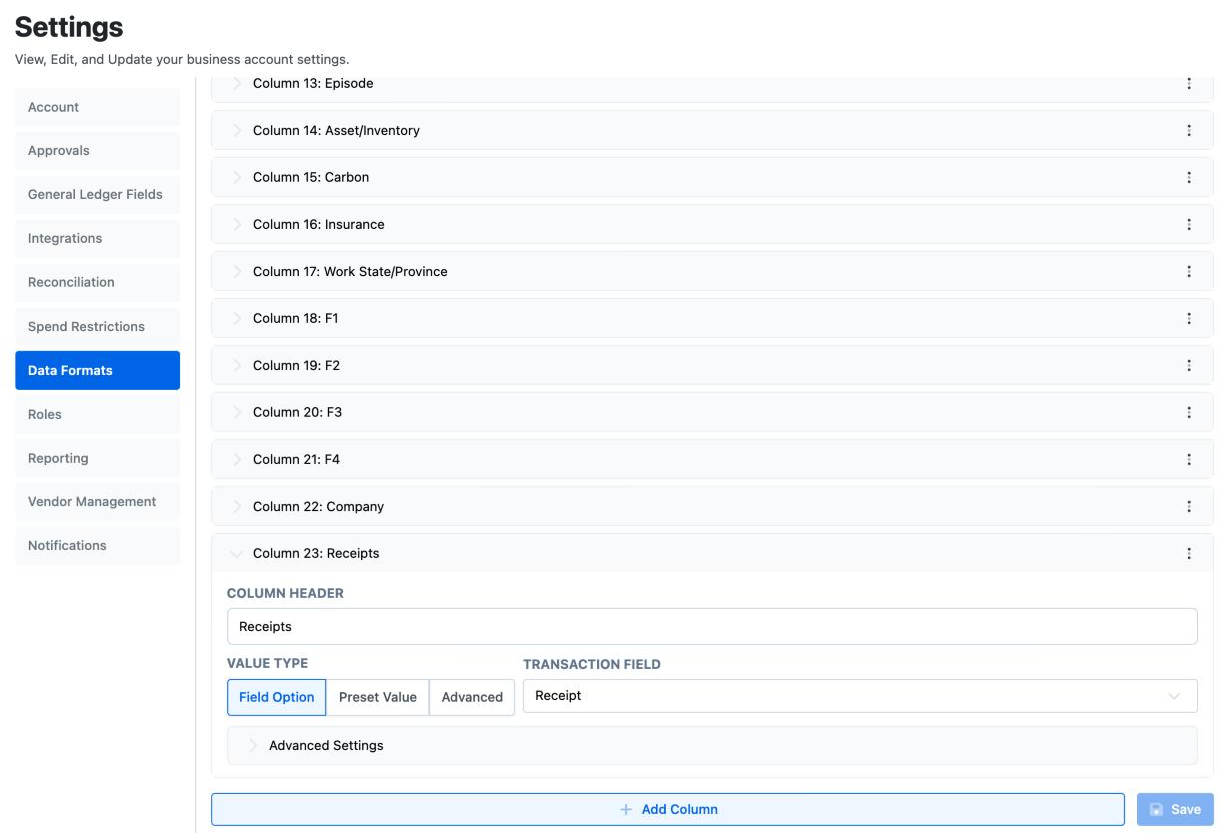
- Go to Settings → Data Formats → Export and choose the data type. Card Transactions is what the Transactions page exports. Envelopes is what an envelope exports. Only admins who manage the production see Settings.
- For each header in your system’s template, choose Add Column. Type the header exactly as the template spells it.
- Pick where the value comes from under Value Type: a Field Option for one Dolly field, such as amount, merchant, settled date, account code or a free field; a Preset Value that is the same on every row, such as a batch or vendor number; or Advanced to combine several fields and your own text.
- Put the columns in the template’s order and choose Save. Reset throws away anything you haven’t saved.
Common things a template asks for
| The template wants | How to build it in Dolly |
|---|---|
| One column with account, set and location together, such as 2015-101-01 | Advanced. Add the account code field, type a hyphen, add the set code field, type a hyphen, add the location field. |
| A fixed company or batch code on every line | Preset Value, with the code typed in. |
| A description no longer than 30 characters | Open the column’s Advanced Settings and, under Max Characters, tick Enable limit. |
| Everything in capitals | Export all text as uppercase, under the columns. |
| No total line at the bottom | Turn off Include total row and Include filter row. |
| Codes like 0305 kept with the leading zero | Export to Excel, not CSV. |
Envelopes can follow the transaction layout
If envelopes should export in the same layout as transactions, open the Envelopes type and turn on Inherit Transaction Export format. Then you only maintain one set of columns.
Line descriptions in your house format
Many systems want the line description in a set pattern, such as the date, then the merchant, then what was bought. Go to Settings → Reconciliation → Description Formatting.
The Default Format applies to every charge. Type the pattern and add Dolly fields with + Add Dolly Field. Use Add Rule for a different pattern on certain detail accounts or kinds of merchant, such as fuel or meals. Max Description Length cuts every description to your system’s limit. Choose Save Changes when you finish.
Test it before you rely on it
- Export one approved envelope with the new layout.
- Import that file into a test batch in your accounting system.
- Compare it with what you expect: amounts, codes, dates and descriptions. Fix the column, save, and export again.
- Once it imports cleanly, tell your accountant the layout changed, so nobody edits the file by hand out of habit.
More on the Data Formats page
- View sets the columns everyone sees on the Transactions page, and the columns in the spreadsheet download. It also sets whether the Transactions page filters by Created Date or Settled Date by default.
- Import appears when your production pays vendors in Dolly. It holds the templates for importing vendors and invoices.
- If you manage more than one show, Sync copies formats from another of them, so a new production starts with the layout you already tested.
Frequently asked questions
- Does Dolly have a layout for my accounting system?
- Entertainment Partners, Cast & Crew, Wrapbook and QuickBooks have ready layouts. For any other system, build one in Settings → Data Formats → Export from your system’s import template.
- Can Dolly Support set the layout up for us?
- Yes. Send Dolly Support your system’s import template, or your GL string, and an example row.
- Will changing the export columns change old exports?
- Files you already downloaded don’t change. Every export after you save uses the new columns.
- Why is my description cut off?
- Max Description Length in Description Formatting, or Max Characters on the column, is shorter than the description. Raise the limit if your system allows it.
Keep reading
Get cards to your crew in as little as 24 hours.
Dolly issues controlled cards to every department, codes each charge to your budget, and keeps spend audit-ready as it happens.