For Admin
Recurring Payments
The short answer
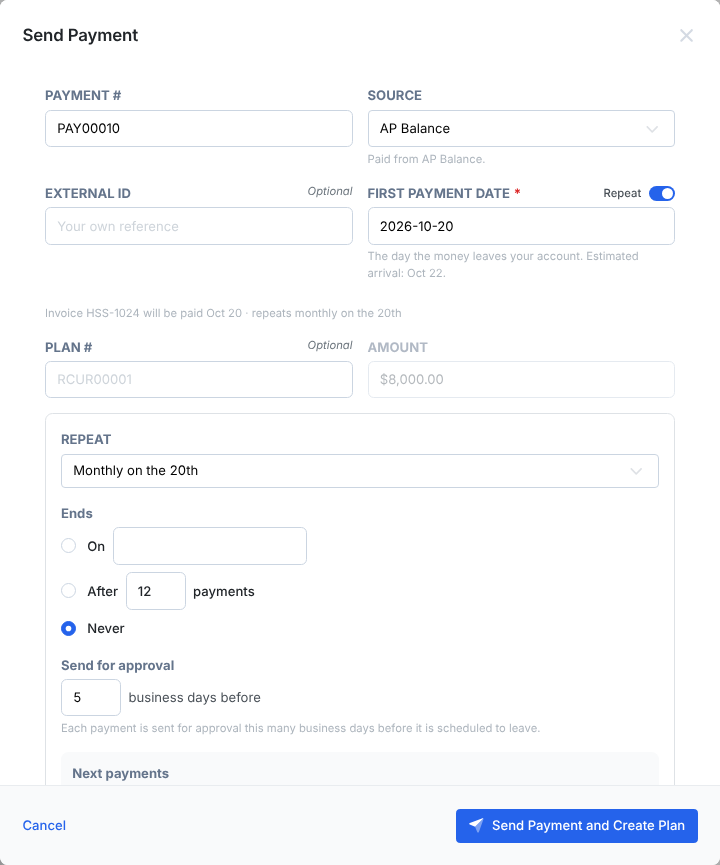
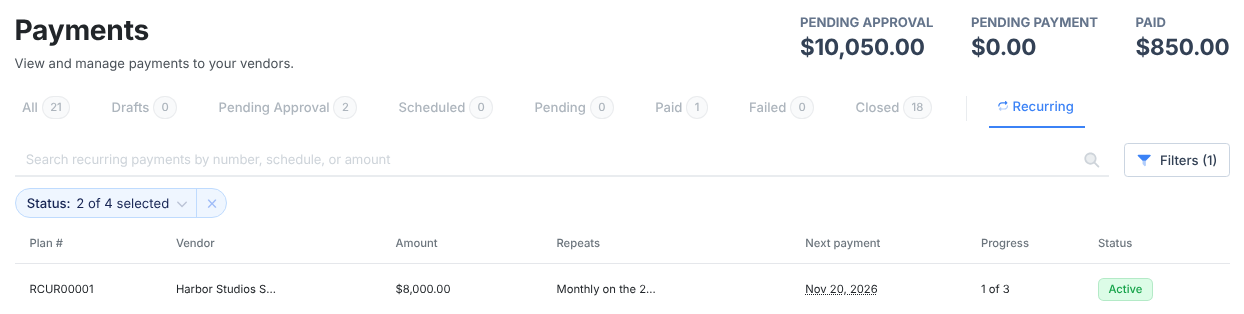
Pay an approved invoice as usual and turn on Repeat next to First payment date. Pick how often it repeats and when it ends, and how many business days before each payment it goes for approval. Dolly creates each payment from that invoice’s lines and amount. Manage it from the Recurring tab on Payments.
Set it up
- Open an approved invoice and choose Pay Invoice.
- Turn on Repeat beside First payment date, and pick the first date.
- Choose how it repeats, for example monthly on the 15th, or Custom. Under Ends, choose Never, a date, or after a number of payments.
- Set Send for approval: each payment goes for approval this many business days before it leaves.
- Choose Send Payment and Create Plan.
Edit, pause or cancel
Open the plan from the Recurring tab. Edit changes payments that have not been created yet; ones already created keep their details. Line items cannot change, because they come from the invoice. To repeat different lines, start a new plan from a new invoice.
Pause stops new payments until you choose Resume. Payments the plan skipped while paused are not created later. Cancel stops it for good and cannot be undone.
Frequently asked questions
- Why did my plan pause by itself?
- The vendor is not ready, for example waiting on approval or a payment method confirmation. It resumes on its own from the next cycle once the vendor is ready.
- I don’t see Repeat.
- Repeat shows only for admins, and only when you pay one approved invoice on its own. Untick any other invoices.
Keep reading
Get cards to your crew in as little as 24 hours.
Dolly issues controlled cards to every department, codes each charge to your budget, and keeps spend audit-ready as it happens.