For Crew
Changing Your Name, Email or Phone
Dolly Card2 min read
The short answer
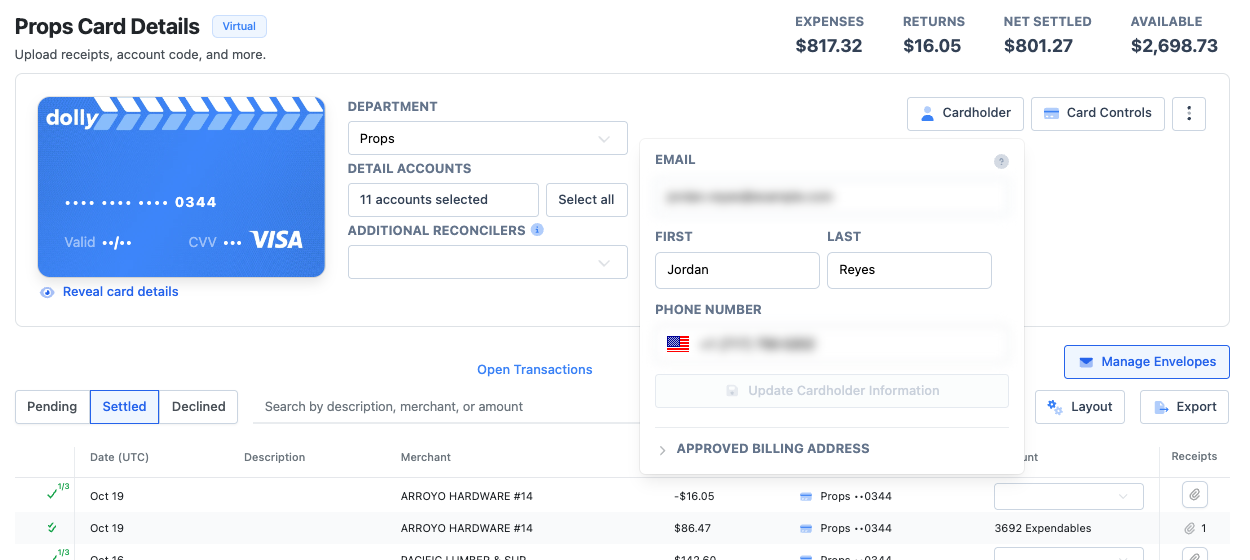
Ask your production’s admin. They change your name, email and phone in the Cardholder panel on your card, under Update Cardholder Information. You can see these details on your card page but can’t edit them.
Why each detail matters
| Detail | What it is used for |
|---|---|
| Phone | How Dolly knows your texts are you. Charge, decline and receipt texts, wallet links and activation all use it. |
| Signing in, PIN codes, and matching receipts you email to receipts@dollycard.com. | |
| Name | The name on the card and on statements. |
Good to know
A new email address gets a new invite to sign in. Changing your password doesn’t need an admin: use Forgot Password? on the sign-in page.
Frequently asked questions
- Can I change my phone number by text?
- No. Ask your admin. Until they change it, texts from a new number won’t be recognized.
Keep reading
Get cards to your crew in as little as 24 hours.
Dolly issues controlled cards to every department, codes each charge to your budget, and keeps spend audit-ready as it happens.
& get cards to your crew in as little as 24 hours.