For Admin & Accounting
Using Dolly with Vensure
Dolly Card3 min read
The short answer
The Vensure integration sends approved envelopes from Dolly to Vensure. It does not pull codes. Dolly Support enters your Vensure license ID. After that, use Post to Vensure on each envelope.
Getting connected
- Ask Dolly Support to connect Vensure. They enter your Vensure license ID.
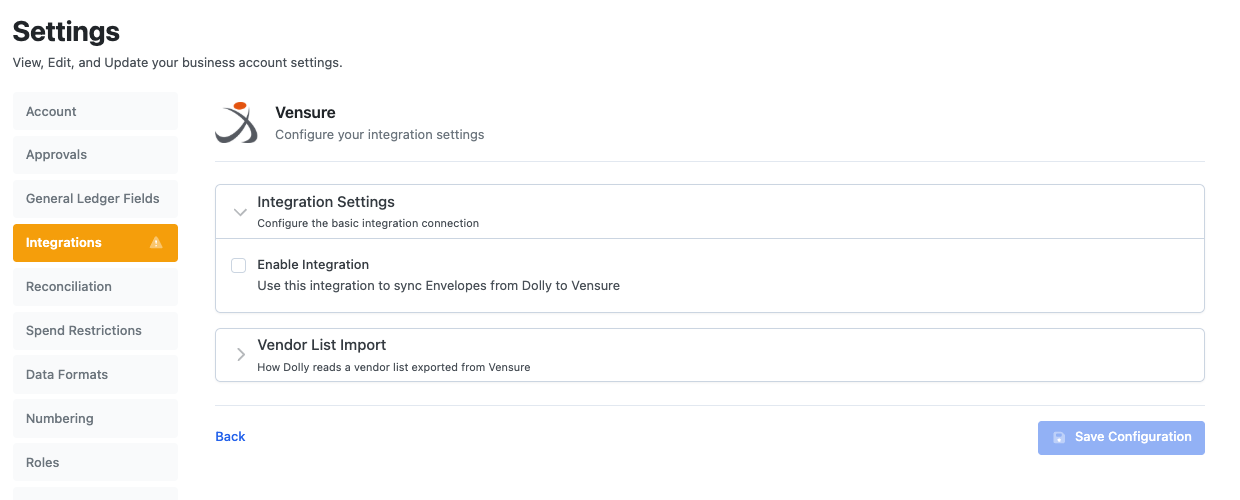
- Check Settings → Integrations → Vensure shows Enable Integration on.
- Each card needs its PCard Vendor Code, the card’s last 6 digits, before its envelopes can post. Dolly Support sets it.
Posting envelopes
On an approved envelope, choose Post to Vensure. To post several, use Settings → Integrations → Sync Data. Exclude Receipts and Prefix Description Sent to Vensure work the same way as for the other integrations.
Your chart of accounts and codes are kept in Dolly. Add or import them under Chart of Accounts and Settings → General Ledger Fields.
Frequently asked questions
- Why is Post to Vensure greyed out?
- The card has no PCard Vendor Code yet, or the envelope is not approved. Contact Dolly Support to set the code.
- Does Vensure send my chart of accounts to Dolly?
- No. The Vensure integration only sends envelopes out. Keep your chart of accounts in Dolly.
Keep reading
Get cards to your crew in as little as 24 hours.
Dolly issues controlled cards to every department, codes each charge to your budget, and keeps spend audit-ready as it happens.
& get cards to your crew in as little as 24 hours.