For Admin & Accounting
Failed, Canceled and Returned Payments
The short answer
A failed payment did not go through; a returned one was sent back by the vendor’s bank. The payment page shows why. Fix the vendor’s details, then choose Retry Payment. The retry does not need approving again. To stop a payment that has not gone out, choose Cancel. A wire cannot be canceled once sent.
Common reasons
| What Dolly says | What to do |
|---|---|
| The vendor’s bank account is closed | Ask the vendor for a new account. |
| The vendor’s bank has no account with that number | Check the account and routing numbers with the vendor. |
| The account number isn’t valid | Check the number with the vendor. |
| The name on the account doesn’t match the vendor | Confirm who owns the account. |
| The vendor’s bank declined it | Ask the vendor to contact their bank. |
When a payment to a bank account fails, Dolly turns that method off so it is not used again by mistake.
Retry a payment
- Fix or add the vendor’s payment method on the vendor page.
- On the failed payment, choose Retry Payment.
- Pick the payment method and choose Retry Payment. The payment is rescheduled without re-approval and keeps its number.
Cancel a payment
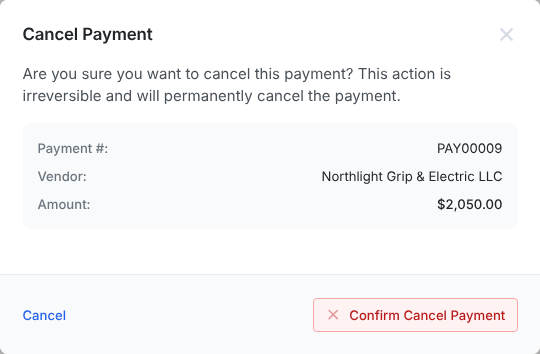
Admins can Cancel a payment that is not paid, failed or returned. Canceling is permanent, and its invoices go back to Approved so you can pay them again. A wire cannot be canceled once sent, and neither can a single-use card the vendor has charged.
If the payment was funded from your bank, the cancel message says what happens to that money: whether the transfer can still be stopped, or whether it will land in your AP balance. You can tick the option to send it back to your bank.
Frequently asked questions
- Can I pause a payment?
- Not a single payment. Cancel it and send a new one when you are ready. Recurring payments can be paused.
- I canceled a payment. Where is the money?
- If it came from your AP balance, it never left. If it was funded from your bank, the payment page says whether the transfer was stopped or the money is in your AP balance, with a link to send it back.
- How do I re-process an invoice whose payment failed?
- Retry the payment rather than making a new one. The invoice moves back to Scheduled.
Keep reading
Get cards to your crew in as little as 24 hours.
Dolly issues controlled cards to every department, codes each charge to your budget, and keeps spend audit-ready as it happens.