FAQ
Why One Order Shows Up as Several Charges
The short answer
Some merchants, including Amazon, charge the card when each item ships, rather than when you place the order. A large order can post as several smaller amounts, days or weeks apart. Before you report a notification as fraud, check whether it is a shipment from an order you already placed.
In Dolly, link those charges into an order. You can then filter the transaction list to that order and keep the confirmation number and receipts with it.
The charge follows the shipment
At a lot of online stores, checkout is the order, and the bill comes later. The store charges the card when a package actually leaves. Amazon works this way. So do many other retailers that ship from more than one warehouse.
If everything in the cart ships together, you see one charge, close to the total you remember. If the items leave on different days, you see one charge per shipment. Each amount is the items in that box. A $400 order can show up as $85 on Tuesday, $160 on Friday, and $155 the week after. None of those notifications is the $400.
The name on the charge can be the seller, rather than the website. An order placed on Amazon Marketplace often posts under the shop that sold the item. A charge from Kroger can still be the grocery order someone placed on Amazon.
Why a real charge looks unfamiliar
A shipment charge is easy to mistake for a charge nobody made.
- The amount is smaller than the order. You remember the cart total. The notification is one box.
- The date is later than the purchase. The charge posts when the item ships, which can be days or weeks after checkout, including after a shoot has wrapped.
- The merchant name is the seller. Marketplace orders bill under the shop, a fulfillment name, or a shortened store name.
- There are several of them. Three notifications in a week can be three boxes from one order.
What to compare
Match the notification to a shipment. The useful details are the merchant or seller, the amount, and the ship date. The store’s order page lists which items went out in which box, and what each box cost.
If the recent charges add up to part of an order you recognize, they belong together. Items still waiting at the warehouse will charge the card when they ship. You may also have seen one pending amount for the whole cart at checkout. What posts is often one charge per shipment. More on that gap is in pending card charges.
Group the shipments into an order
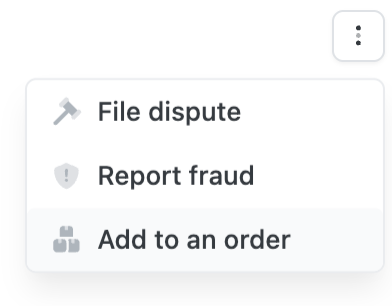
Dolly has an orders feature for charges a merchant billed separately that belong to one purchase. Open a charge and choose Add to an order. Put every shipment from that checkout on the same order.
That choice sits on the same menu as File dispute and Report fraud. Use Add to an order when the charge is a piece of a purchase you already made.
Filter the list to that order
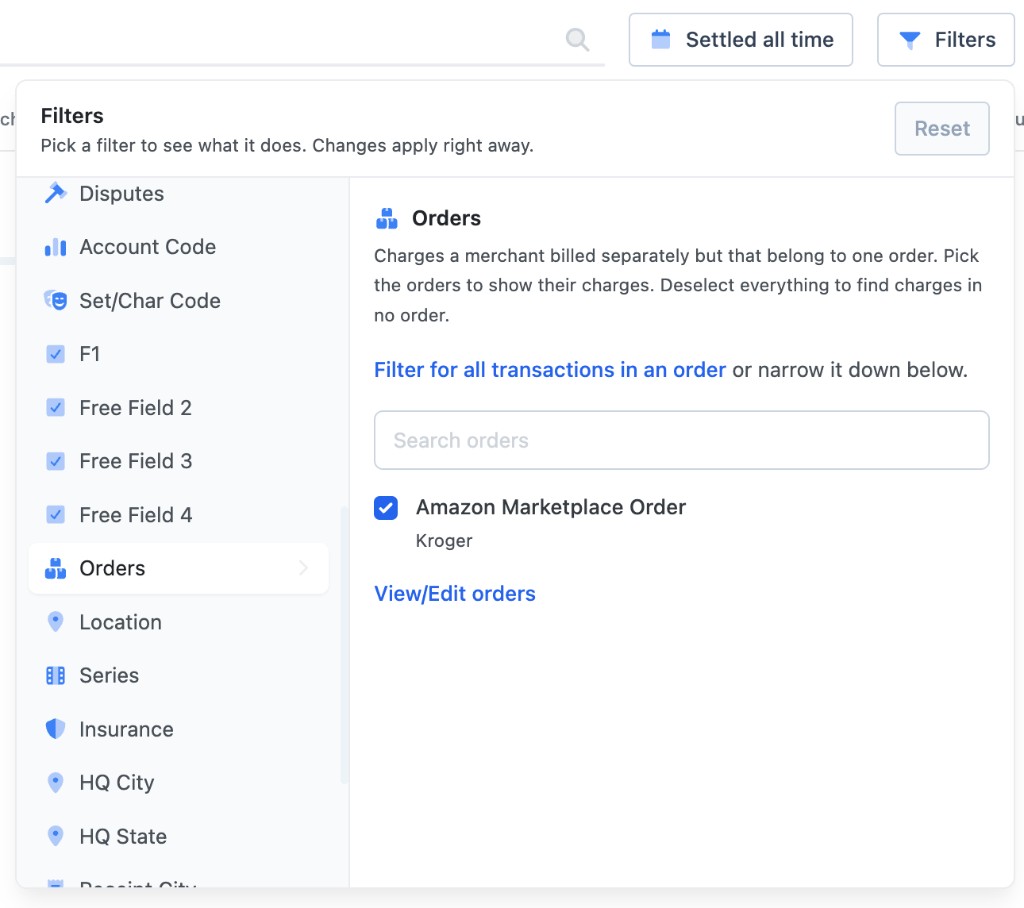
Once the charges are linked, open Filters and choose Orders. Pick the orders whose charges you want to see, or filter for every transaction that sits on an order and then narrow it down. Search if the list is long.
View/Edit orders is where you add the confirmation number and the receipts, so the paperwork stays with the purchase. Deselect everything in the orders list to find charges that are in no order yet. Those are the shipments still waiting to be grouped.
When a notification arrives
- Look up the original order in the confirmation email or on the store’s site. Note what has shipped and what each shipment cost.
- Match the card charge to a shipment, including a seller name that is not the website.
- Add the charge to that order in Dolly, and keep the confirmation number and the receipt on the order.
- Contact Dolly when nothing matches. If the order page has no shipment for that amount, write support@dollycard.com or call 1 (508) 203-6861 and turn the card off. See disputing a charge.
Frequently asked questions
- Why was I charged less than my order total?
- The store billed a shipment, not the whole cart. Amazon and many other retailers charge when items ship. Each box is its own amount. Later boxes charge the card when they leave.
- A charge showed up days after I ordered. Is it fraud?
- Check the original order first. A later, smaller charge is often a shipment from a purchase you already made. Report it as fraud when nobody on the production placed an order that includes that amount.
- The merchant name is not the website I ordered from. Is the charge still mine?
- It can be. Marketplace orders often post under the seller. An Amazon order can show up as the shop that fulfilled it, such as Kroger, rather than as Amazon.
- How do I keep split charges together in Dolly?
- Open each charge and choose Add to an order. Then filter Transactions by that order. View/Edit orders is where you add the confirmation number and the receipts.
- Can I find charges that are not on an order yet?
- Yes. In Filters, open Orders and deselect everything. That list is charges in no order.
Keep reading
Get cards to your crew in as little as 24 hours.
Dolly issues controlled cards to every department, codes each charge to your budget, and keeps spend audit-ready as it happens.